
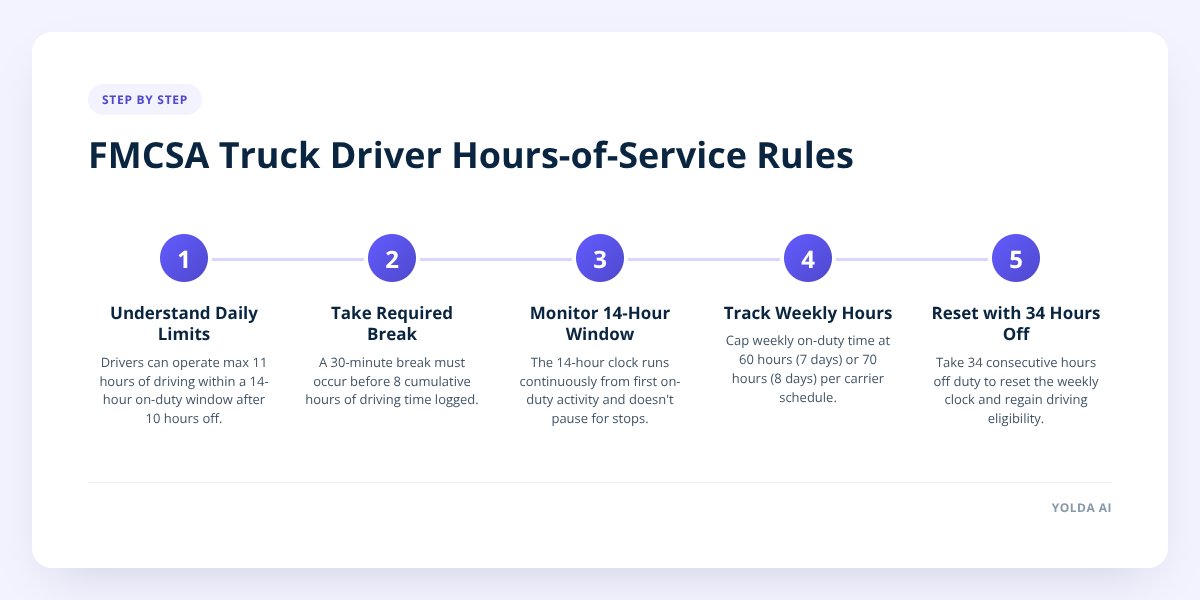
Quick answer: Under the FMCSA's hours-of-service rules for property-carrying drivers, the limit is 11 hours of driving within a 14-hour window after 10 consecutive hours off duty. A driver also needs a 30-minute break before 8 cumulative hours of driving, and can't drive after hitting 60 hours on duty in 7 days or 70 hours in 8 days, unless that total resets with 34 consecutive hours off. These are federal limits set by the Federal Motor Carrier Safety Administration, and most carriers plan routes and schedules around them closely.
Key takeaways
- The 11-hour driving limit sits inside a 14-hour on-duty window that starts the moment a driver goes on duty — the window keeps running even during breaks or fueling stops.
- A 30-minute break is required before 8 cumulative hours of drive time, and it must be off-duty, sleeper berth, or on-duty not-driving time, per the FMCSA.
- The 60/70-hour rule caps weekly on-duty time at 60 hours in 7 days (carriers not operating every day) or 70 hours in 8 days (carriers operating every day), reset by 34 straight hours off duty.
- A driver using the sleeper berth can split their required 10 hours off into two periods — one of at least 7 hours and the other of at least 2 hours — under the FMCSA's sleeper berth provision.
What are the actual HOS limits for truckers?
The core rules for property-carrying commercial drivers come from the FMCSA's hours-of-service regulations at 49 CFR Part 395. There are four separate limits, and a driver has to satisfy all of them at once, not just the one that seems most relevant that day.
Here's how they break down:
| Rule | Limit | Key condition |
|---|---|---|
| Driving limit | 11 hours | Only after 10 consecutive hours off duty |
| Duty window | 14 hours | Clock starts at first on-duty activity, doesn't pause |
| Required break | 30 minutes | Must come before 8 cumulative hours of driving |
| 7-day limit | 60 hours on duty | For carriers not operating every day of the week |
| 8-day limit | 70 hours on duty | For carriers operating every day of the week |
| Restart | 34 consecutive hours off | Resets the 60/70-hour clock |
A driver can be perfectly within the 11-hour driving limit and still be out of hours because the 14-hour window ran out first. That's the detail that trips up a lot of new drivers and dispatchers — the 14-hour clock doesn't stop for a fuel stop, a loading dock delay, or lunch. It only pauses for a qualifying sleeper berth split or certain short-haul exceptions.
Why does the 14-hour window matter more than the 11-hour limit?
Because the window is the one that actually runs out first in most real schedules. A driver can have driving hours left on paper and still be legally done for the day because the 14-hour clock has expired.
Say a driver goes on duty at 6:00 a.m. to do a pre-trip inspection. From that moment, the 14-hour window is ticking, whether they're driving, waiting at a shipper, or sitting in traffic. If they spend 2 hours loading and unloading over the course of the day, they've used up 2 hours of that window without logging a single mile of driving.
That means by 8:00 p.m. — 14 hours after 6:00 a.m. — they're done driving for the day, even if they've only logged 9 hours behind the wheel. The only way to get more drive time back is the 10-hour (or split sleeper berth) reset.
This is exactly why dock delays and detention time matter so much to a carrier's bottom line, not just to the driver's patience. Every hour lost at a shipper is an hour that can't be recovered later that day.
What does a sample driving day actually look like?
Here's a worked example using a typical long-haul day, starting from a 10-hour off-duty reset:
- 6:00 a.m. — Driver goes on duty, does pre-trip inspection. The 14-hour window starts now.
- 6:15 a.m. — Driving begins.
- 10:15 a.m. — 4 hours of driving logged. Driver stops for fuel and a short break (doesn't count toward the required 30-minute break unless it's logged as off-duty or sleeper berth).
- 10:45 a.m. — Back on the road.
- 2:15 p.m. — Driver hits 8 cumulative hours of driving. The 30-minute break must have already happened by this point, per the FMCSA's break requirement.
- 2:45 p.m. — Resumes driving after the break.
- 5:45 p.m. — Driver hits 11 hours of total driving time. Must stop driving now, regardless of how much of the 14-hour window is left.
- 8:00 p.m. — The 14-hour window closes. Driver must be off duty or in the sleeper berth.
In this example, the driver used all 11 driving hours before the 14-hour window ran out — a clean day. But if that same driver had spent an extra hour detained at a shipper mid-morning, they'd have hit the 14-hour wall before finishing their 11 hours, losing drive time they never got to use.
Don't skip this: The 30-minute break has to happen before the 8th cumulative hour of driving, not the 8th hour of the workday. A driver who's been loading, fueling, and doing paperwork for 6 hours but has only driven 7 hours and 45 minutes still needs that break before driving one more minute, according to the FMCSA.
How does the 60/70-hour rule affect a week of work?
It caps how much total on-duty time a driver can rack up before a mandatory multi-day reset, and it's the rule that most often decides when a driver can legally take a new load. A driver operating on the 70-hour/8-day schedule who has already logged 68 hours on duty this week has only 2 hours left before they're out of hours — even if they're well under their daily 11-hour driving limit.
The only way to get back to a full 60 or 70 hours is a 34-hour restart: 34 consecutive hours off duty, which resets the weekly clock to zero, per FMCSA regulations. Short of that, the hours used earlier in the week simply age off day by day as the 7-day or 8-day window rolls forward — a driver doesn't get hours back until the oldest day drops out of the count.
This is where planning gets genuinely hard for a dispatcher juggling several drivers and several loads:
- A driver might have driving hours and duty-window hours left but no weekly hours left.
- Two drivers who look interchangeable on a load board might have completely different available hours once you check their logs.
- A load that looks like a same-day turn can quietly turn into an overnight hold once the numbers are run.
That's the dispatch problem in a nutshell: HOS isn't one number, it's four numbers running at once, and the tightest one wins. We cover more of the planning side of this in Why Your ELD and Dispatch Board Should Talk to Each Other, since a dispatcher working from a board that doesn't reflect live HOS status is planning against numbers that are already stale.
What happens when HOS rules and a load schedule collide?
The load gets reassigned, delayed, or split — there's no legal way around a driver's remaining hours. This is the moment where a lot of dispatching goes wrong: a dispatcher books a load assuming a driver has a full day left, without checking where that driver actually sits on all four HOS clocks.
A connected system changes what a dispatcher sees before they commit to a load. Yolda's dispatch tools show a driver's live HOS status on the fleet map, pulled from a connected ELD, alongside their ETA — so a dispatcher can see at a glance whether a driver has enough hours left for a given run before the load gets assigned, not after the truck is already rolling and behind schedule. You can see how that fits into day-to-day dispatching on the dispatch page.
There are also emergency exceptions that change these numbers temporarily — regional disasters, fuel shortages, and similar declared emergencies can trigger FMCSA relief that extends certain limits for a defined period. Those exceptions have their own rules about who qualifies and how long they last, which we cover in How to Use FMCSA's 30-Day Emergency HOS Relief Correctly.
Do the sleeper berth rules change any of this?
Yes — a driver using a sleeper berth can split the required 10 hours off duty into two separate periods, which gives more flexibility but doesn't change the total hours allowed. Under the FMCSA's sleeper berth provision, one period must be at least 7 consecutive hours in the sleeper berth, and the other must be at least 2 hours, either in the sleeper berth or off duty.
Neither period by itself counts against the 14-hour window while it's in progress, which is why long-haul teams and solo drivers running overnight routes use this split regularly. But both periods together still have to add up to at least 10 hours before a driver's 14-hour window and 11-hour driving limit reset. It's a scheduling tool, not a loophole — the daily and weekly limits are exactly the same either way.
If you're dispatching a mixed fleet of team and solo drivers, those split schedules are exactly the kind of detail that's easy to miscalculate on a whiteboard or spreadsheet, and easy to get right when the HOS data comes straight from the ELD instead of a driver's memory.
Running a fleet on accurate HOS data isn't just about avoiding violations — it's what makes next-day planning realistic instead of a guess. If dispatch is still working off driver phone calls and a dry-erase board, book a demo to see how live HOS status on the dispatch map changes that conversation.
Checklist: Planning a driver's day around HOS limits
- Confirm the driver's last 10-hour (or split sleeper berth) reset before assigning a new load.
- Check remaining weekly hours (60 or 70, depending on the carrier's operating schedule), not just daily hours.
- Build in time for the required 30-minute break before 8 cumulative hours of driving.
- Account for the full 14-hour window, including loading, fueling, and detention time — not just drive time.
- Verify live ELD-reported HOS status before committing a driver to a tight-turn load.
- Flag any driver approaching a 34-hour restart so dispatch can plan around the downtime.
- Document any emergency HOS relief separately — it doesn't apply by default and has its own conditions.


