Receivables and aging
Open, closed and for-review invoices on one page, aged 0 to 30, 31 to 60, 61 to 90 and over 90 days, with the overdue total on top and a CSV export for your bookkeeper.
Yolda turns every delivered load into an invoice, records what customers pay, puts fuel, tolls and bills on the right truck, and closes a profit and loss for each truck every week, without typing a load into a second system.
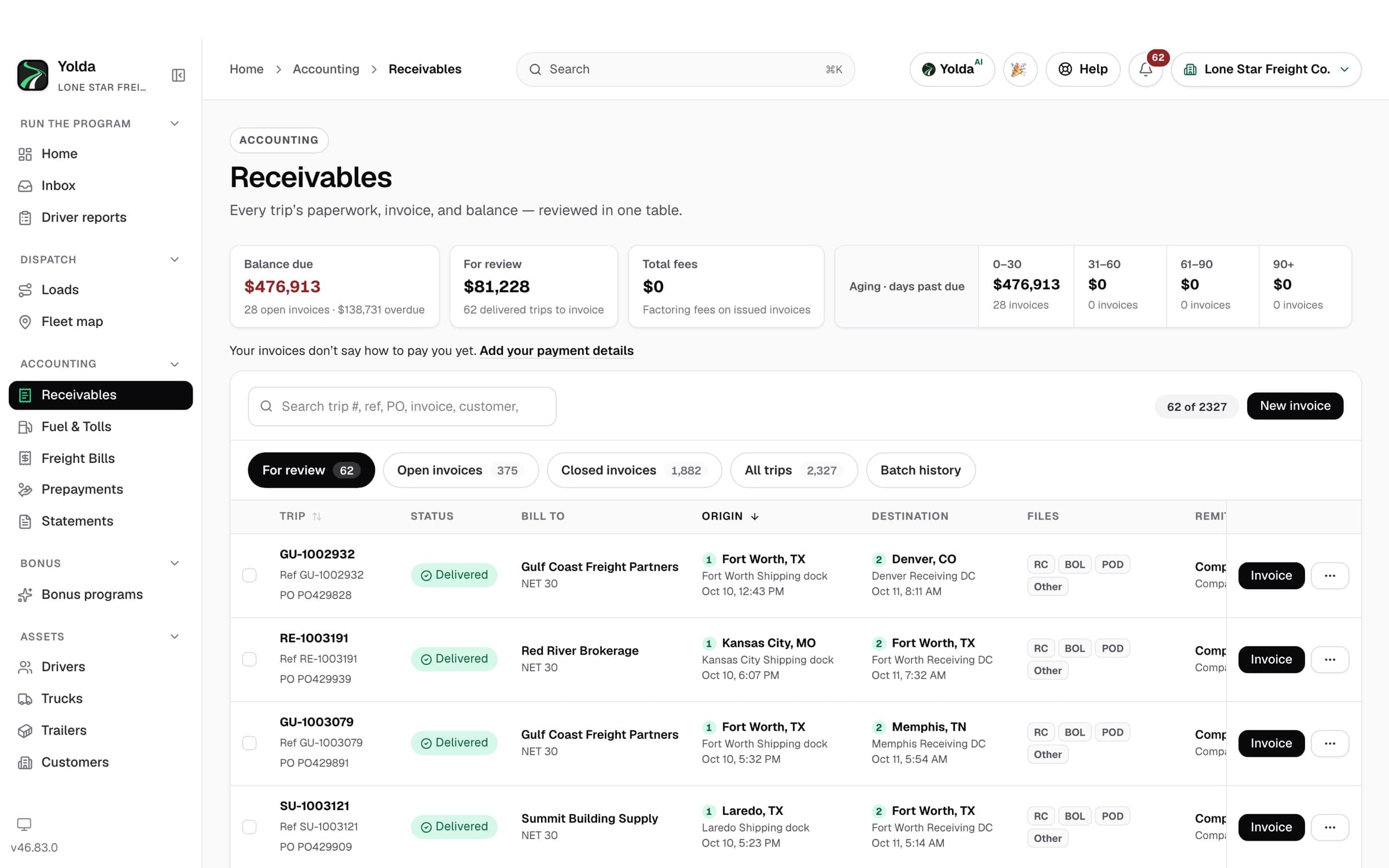
When dispatch marks a load delivered and approves the POD, it waits on the For review tab in Receivables with the rate, fuel surcharge, accessorials and documents already on it. Invoice one load, or select several for the same customer and send one invoice.
Yolda makes the invoice PDF with your remit-to details and emails it to the customer's billing email. If a broker requires the rate confirmation, Yolda will not send the invoice until every load on it has one. A factored invoice remits to your factor instead.
For a factored invoice, Yolda bundles the invoice, rate confirmation, BOL and POD. Email the packet to your factor, upload it to your own SFTP folder at the factor (Triumph's file format is supported), or download it as a ZIP.
Mark an invoice paid or add a payment as it arrives, partial payments included, with the method: bank transfer, check, wire, card, cash or factoring advance. A mistake is reversed, never edited away, so the history stays honest.
Fuel card and toll charges come in from the feeds you connect, receipts are scanned, and vendor bills and load charges are entered once. Each cost is tied to its truck and driver, and the pay agreement decides whether the driver carries it.
Each week Yolda closes an operating statement for every truck: revenue, miles, driver pay, fuel, tolls and maintenance. You see which units made money without building a report.
Open, closed and for-review invoices on one page, aged 0 to 30, 31 to 60, 61 to 90 and over 90 days, with the overdue total on top and a CSV export for your bookkeeper.
Revenue, receivables, payment status, profit, costs, revenue per mile, and net contribution by driver, truck or truck owner, for any period, as a PDF or CSV.
EFS, Comdata, WEX, Motive Card, Pilot, Love's, TCS, Relay and QuikQ fuel feeds, PrePass and Bestpass tolls, or an imported statement file. The gallons flow into your IFTA quarter too.
Record vendor bills and per-load charges once. A maintenance bill can be split between the company, the driver and the truck's owner.
Driver pay comes from the same delivered loads, priced by each driver's pay agreement, with deductions, bonuses and advances. You approve each weekly statement and pay through your usual process.
Connect QuickBooks Online and invoices, payments, fuel, tolls and bills post to the accounts you mapped as you save them. Your accountant keeps the books they know.
Invoice from the load, see what each truck made, and hand your accountant clean numbers. See Yolda for owner-operators.
One place for receivables, payments, costs and driver statements, shared with dispatch. See Yolda for small fleets.
Investors who own trucks in your fleet get their own statements, and costs follow the agreement on who pays what. See driver settlement software.
Yolda does the trucking-specific work: invoices from loads, costs per truck, driver pay. QuickBooks stays your general ledger. See exactly what posts on the QuickBooks Online integration page. Working out driver pay each week? See our trucking payroll software.
Every Yolda plan includes every module, with unlimited users and drivers. Plans are priced by the number of trucks you run, and self-serve plans start with a 30-day free trial with no credit card required to start.
It handles the money side that general accounting tools don't know about: invoicing loads with their rate confirmations and PODs, factoring, fuel and tolls by truck, driver pay by load, and profit per truck. Yolda does all of that from the loads dispatch already entered.
No. Yolda does the trucking work and posts invoices, payments and costs to QuickBooks Online, so your books stay in QuickBooks and nobody types them twice.
Yes. Every truck gets a weekly operating statement with revenue, miles, driver pay, fuel, tolls and maintenance, and the reports show profit and net contribution by truck, driver or truck owner.
Yes. Mark an invoice as factored and it remits to your factor. Yolda builds the packet (invoice, rate confirmation, BOL and POD) and emails it, uploads it to your SFTP folder at the factor, or downloads it as a ZIP. Direct connections to factoring companies are planned.
No. Customers pay you the way they do today, and you pay drivers through your usual payroll or bank process. Yolda records the payments so your receivables and statements are right.
Accounting is included in every Yolda plan. Plans are priced by truck count, from $99 a month for 1–5 trucks, with unlimited users and drivers. Self-serve plans start with a 30-day free trial, and no credit card is required to start.