
Quick answer: When FMCSA or a state declares a regional emergency, qualifying carriers get a 30-day window of relief from certain hours-of-service limits under 49 CFR 390.23 — but the relief only covers direct assistance to the emergency, and every mile run under it needs its own documentation trail. Drivers hauling unrelated freight, or continuing past the point of providing relief, lose the exemption's protection the moment they're no longer doing emergency work. The fastest way to keep your compliance record clean is to log the declaration, the qualifying load, and the hours separately from normal operations — not after the fact, but as you go.
Key takeaways
- Federal emergency relief under 49 CFR 390.23 runs for up to 30 days from the declaration, and carriers can request an extension if FMCSA grants one for that specific emergency.
- The exemption covers direct assistance — think fuel, medical supplies, food, water, and evacuation support — not a driver's entire operation for the month.
- A driver must stop relying on the exemption and take normal off-duty time once they're done providing relief, even if the 30-day window hasn't closed.
- FMCSA and the Federal Register publish the actual declarations; always confirm an emergency is active and still covers your region before you log any hours against it.
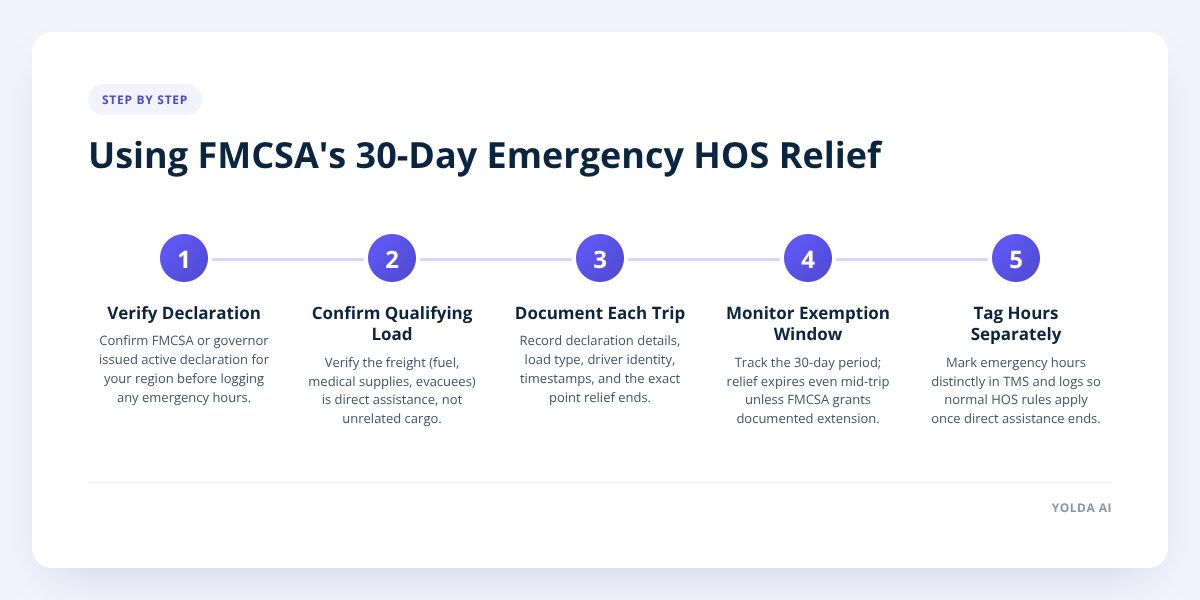
What counts as an FMCSA-approved emergency, and how long does the relief last?
An FMCSA-qualifying emergency is a declared disaster or regional crisis — hurricanes, wildfires, severe winter storms, fuel shortages, or similar events — where the agency or a state governor issues a formal declaration that triggers relief under 49 CFR 390.23. The relief doesn't apply just because conditions are bad; it applies because a specific declaration says so, for a specific region, for a specific kind of freight.
Once a declaration is active, FMCSA's regulation provides for up to 30 days of relief from certain hours-of-service rules — not an indefinite pass. According to FMCSA, the relief can be extended if the agency determines the emergency is ongoing, but that extension isn't automatic. If you're still invoking relief on day 35 without a documented extension, you're exposed.
The relief only covers drivers providing direct assistance to the emergency. FMCSA defines this narrowly:
- Transporting essential supplies — fuel, water, medicine, food — into the affected area
- Evacuating people or livestock out of the affected area
- Providing emergency equipment, construction materials, or utility restoration support
- Returning empty after delivering direct assistance (this leg is typically covered too, but confirm against the specific declaration)
What it does not cover: a driver who happens to be in the region but is hauling an unrelated load, or a driver who finishes the emergency run and then keeps working past normal HOS limits because the declaration is technically still open. The exemption tracks the work, not the calendar.
Don't skip this: The moment a driver stops providing direct assistance to the declared emergency, FMCSA requires them to take the off-duty time needed to be fully rested before resuming normal operations. Treating the whole 30-day window as a blanket HOS suspension is the single most common way carriers turn a legitimate exemption into a violation.
How do you document emergency HOS use so it doesn't trigger an audit?
Document every emergency trip as if an auditor will read it cold, with no context, six months from now. The exemption protects you legally, but only if your records show the relief was used correctly — FMCSA and state enforcement can and do review emergency-relief logs after the fact.
For each load run under the exemption, capture:
- The declaration itself — which agency or governor issued it, the date, and the geographic area it covers
- The nature of the relief — what was hauled (fuel, medical supplies, evacuees) and why it qualifies as direct assistance
- Driver identity and time stamps — when the emergency work started and ended for that driver specifically
- The point where relief ended — the moment the driver was no longer providing direct assistance, and the off-duty period that followed
- Normal HOS records for everything outside the emergency window — don't let emergency and non-emergency hours blur together in the same log
A clean paper trail does two things: it protects the driver if they're pulled over and asked to explain hours that exceed the normal limit, and it protects the carrier if FMCSA later reviews the emergency period across the fleet. Carriers that treat emergency relief like a normal dispatch note — a line in a spreadsheet, maybe a text message — are the ones who struggle to reconstruct what happened when a compliance review asks for specifics eight months later.
This is also where keeping a standing DOT compliance calendar pays off — an emergency period is easier to document cleanly when you already have a system tracking dates, not just sticky notes.
What should your TMS and DVIR app flag during a relief period?
Your tracking systems need to separate emergency hours from everything else in real time, not reconcile them later. If your TMS and your driver's logs don't clearly tag which hours fall under the exemption, you've created a gray zone that looks like a violation on paper even when it wasn't one.
Here's what to watch for during an active relief window:
| What to track | Why it matters |
|---|---|
| Declaration start/end dates per region | Relief expires even if the driver's trip doesn't |
| Load type and destination | Confirms the trip qualifies as direct assistance |
| Driver on-duty time vs. normal HOS limit | Shows exactly how much the exemption was used |
| Point of "relief completed" per driver | Marks when normal HOS rules resume |
| DVIR entries during extended hours | Fatigue-related defects need extra scrutiny on longer shifts |
| Off-duty recovery period after relief ends | Required before the driver returns to standard dispatch |
A driver vehicle inspection report (DVIR) matters more than usual during emergency operations because drivers are often running longer hours under harder conditions — storm damage, road debris, detours. A DVIR app that lets a driver flag a defect from the cab and routes it straight to the safety team, rather than waiting for a paper form at the yard, catches problems before they become out-of-service violations layered on top of an already complicated emergency period.
This is the kind of gap that a dedicated DOT compliance and DVIR platform is built to close — one place where inspection reports, compliance dates, and violation tracking live together instead of across three disconnected tools. Yolda's safety and compliance management module keeps DVIRs, inspection history, and expiring compliance documents in one view, so a fleet manager reviewing an emergency period later isn't piecing together texts, paper logs, and a separate ELD portal.
What mistakes make carriers lose emergency relief protection?
The most common mistake is letting the exemption run past the point the driver finished providing emergency assistance. FMCSA's rule is about the work being done, not the 30-day clock — a driver who delivered emergency fuel on day 3 and then kept running extended hours on unrelated freight through day 20 isn't protected for those extra 17 days.
Other mistakes that invalidate relief or create audit risk:
- Applying the exemption fleet-wide without checking each load — relief covers specific qualifying trips, not every truck in your fleet for the month
- Failing to log the handoff moment — not recording exactly when a driver stopped doing emergency work and started their required rest period
- Mixing emergency and standard dispatch on the same multi-day run — this makes it nearly impossible to show which hours fall under which rule
- Assuming a company-wide "emergency mode" exists — there's no such designation; relief is tied to a specific government declaration, region, and type of work
- Not confirming the declaration is still active before dispatching a load against it — declarations expire, get narrowed, or get extended, and you need to check the current status rather than assume
A driver out-of-service order resulting from a fatigue violation during a misapplied emergency period doesn't just cost that one driver hours — it can affect your CSA scores and show up in future hiring and insurance conversations. We covered how out-of-service findings ripple into hiring decisions in How FMCSA Out-of-Service Orders Affect Hiring and Compliance, which is worth a read if you're not already tracking that connection.
How do you reset driver schedules after relief expires?
Once relief expires — whether the 30-day window closes or the driver's emergency work simply ends — every driver who used the exemption needs a documented return to standard HOS before their next dispatch. This isn't optional cleanup; it's the step that closes the loop on your compliance record.
Work through this in order:
- Confirm the exact date and time each driver's emergency relief use ended
- Verify each driver took the off-duty time FMCSA requires before resuming normal operations
- Recalculate each driver's rolling 60- or 70-hour total using standard rules from the point relief ended, not from zero
- Archive the emergency documentation (declaration, load records, time logs) together as one package per driver, in case of a later review
- Flag any driver whose logs show a gap between "relief ended" and "normal HOS resumed" — that gap is the single biggest red flag in an audit
- Update your compliance dashboard or TMS so emergency hours are clearly marked as historical, not active
This is also a good moment to pressure-test whether your current systems made this reconciliation easy or painful. If pulling together declaration dates, load records, and driver hours took a week of cross-referencing spreadsheets and paper DVIRs, that's a signal worth acting on before the next emergency hits — not during one.
If a recent switch (or a bad one) is on your mind, 8 Questions Before Switching Trucking Software walks through what to check before you commit to a new system.
Emergency relief exists to help carriers respond fast when it matters. Keeping the documentation airtight is what makes sure that help doesn't turn into a compliance problem six months later. If your fleet's safety records, DVIRs, and compliance dates currently live in separate tools, Yolda brings them into one dashboard so an emergency period — or a routine audit — is a quick lookup, not a scramble. See how Yolda's compliance tracking works or book a demo to walk through your fleet's setup.
Checklist: Using FMCSA emergency HOS relief correctly
- Confirm the emergency declaration is active and covers your region before dispatching.
- Verify the load qualifies as direct assistance — not just freight moving through the area.
- Log the declaration source, dates, and covered region with the load record.
- Record each driver's emergency on-duty start and end times separately from normal hours.
- Mark the exact point each driver stopped providing direct assistance.
- Confirm required off-duty recovery time was taken before normal dispatch resumed.
- Flag DVIR entries submitted during extended emergency hours for extra review.
- Recalculate each driver's rolling HOS total once relief ends.
- Archive all emergency documentation together per driver for future reference.

