An open book for every driver
Each statement shows the rate each load paid and the loaded and empty miles behind it, so a percentage or per-mile driver can check the math instead of calling the office.
Pick a driver and Yolda gathers the week's delivered loads, deductions, reimbursements, bonuses and advances into one statement, priced by their pay agreement. You decide what goes on it, approve it, and the driver gets a clear PDF. You pay your usual way and record it.
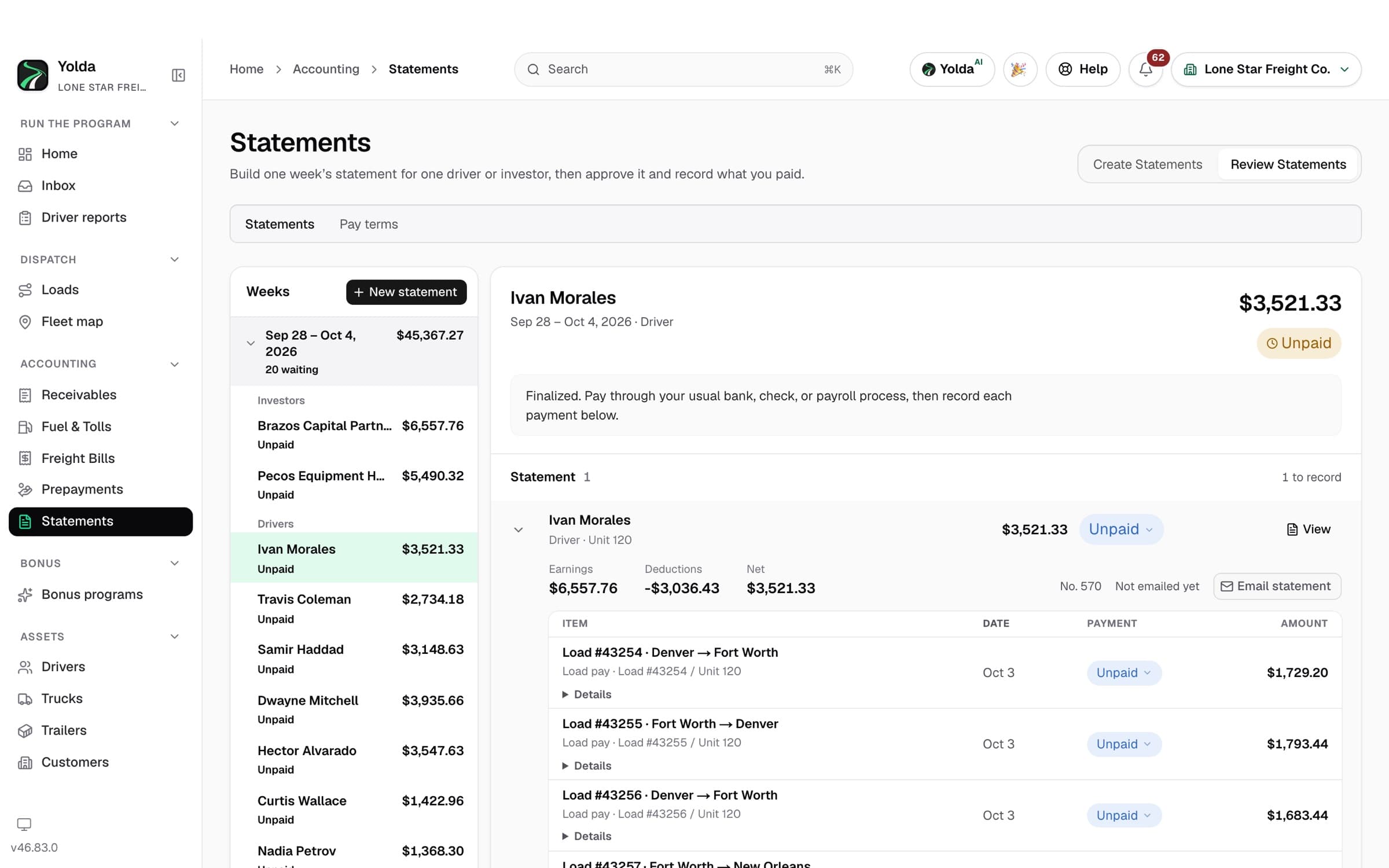
On the Settlements page, choose a driver or a truck owner for the current week. Yolda lists everything that can go on their statement: each delivered load priced by their pay agreement, deductions such as a truck lease, reimbursements, bonuses and advance installments.
Include or leave out each line, adjust an amount, or add one the system could not know about. A deduction installment you leave out this week comes back next week; nothing is lost or charged twice.
The draft goes to the person who approves statements. A statement left waiting is not forgotten: approvers get a daily reminder that grows more urgent the longer it waits.
Approving freezes the statement and its PDF and emails each driver, and each truck owner, their own copy. Drivers also see it in the Yolda driver app. An approved statement never changes, so the numbers you approved are the numbers on record.
Pay through your usual payroll, ACH, check, wire or cash. Then record the payment in Yolda for the whole statement, part of it, or item by item, with the method, reference and date. A partly paid statement shows exactly what is still unpaid.
Each statement shows the rate each load paid and the loaded and empty miles behind it, so a percentage or per-mile driver can check the math instead of calling the office.
Percentage of the load, per mile or flat per load, plus TONU, detention, deductions, reimbursements, bonuses and advances, each priced by the agreement in force when the load was delivered.
A truck lease or an advance can run every week with no end, or be split over a set number of weeks. Each statement shows what was taken and what is left, and an escrow (Depository) keeps its own register.
Investors who own trucks in your fleet get their own weekly statements, next to the drivers they hire, and a cost lands on the statement of the one party who pays it.
Composing, approving and recording payment are separate permissions, and everyone who holds one must sign in with two-step verification. Every approval and payment record is kept.
Drivers can share how they want to be paid in the app. The numbers are encrypted, and payroll staff see them only after entering a one-time code sent to their own email.
Statements come from the loads dispatch already entered, so Monday is review and approve, not rebuild. See trucking payroll software for how pay is priced.
Leases, escrow, fuel and tolls are charged the way the agreement says, and every line is on the statement. See owner-operator settlements.
Pay that drivers can read and check is one less reason to leave. See transparent settlement reporting.
Yolda builds and records the settlement statement; it is not a payment service. Drivers are paid through your own payroll, bank or check process, and Yolda records what you reported as paid. Every statement comes from loads your team ran in dispatch, the same numbers behind your trucking accounting software and per-truck profit. Settlements are one part of Yolda's TMS software for carriers.
Every Yolda plan includes every module, with unlimited users and drivers. Plans are priced by the number of trucks you run, and self-serve plans start with a 30-day free trial with no credit card required to start.
It is the weekly statement of what a driver earned and what was deducted: each load's pay, plus reimbursements, bonuses and advances, minus deductions such as a truck lease or escrow. Driver settlement software builds that statement from the loads instead of a spreadsheet.
No. Yolda builds the statement and records the payment you make; you pay drivers through your own payroll, bank or check process. Yolda never holds or moves money, and it charges nothing on driver pay.
No. Yolda gathers everything that can go on a driver's statement, and a person decides each line and approves it. Nothing is sent to a driver until someone with approval rights approves it.
Yes. Every statement shows the rate each load paid and the loaded and empty miles behind it, in the PDF and in the driver app.
Yes. Owner-operators and lease operators have their own pay terms, and leases, escrow, advances, fuel and tolls come off as the agreement says. Truck owners who hire drivers get their own statements too.
Yes. Record the whole statement, part of it, or individual items as paid. The statement shows Partly paid and what is still owed until every item is recorded.
Settlements are included in every Yolda plan. Plans are priced by truck count, from $99 a month for 1–5 trucks, with unlimited users and drivers. Self-serve plans start with a 30-day free trial, and no credit card is required to start.