
Quick answer: An out-of-service order stops a driver, vehicle, or entire carrier from operating until a specific violation is fixed, and it can surface in background checks for years afterward. The fastest way to avoid one is to keep driver qualification files, DVIRs, and maintenance records audit-ready every day, not just before an inspection. If you already have one, the recovery path is documented, time-bound, and worth following step by step rather than guessing.
Key takeaways
- Out-of-service orders are issued at three separate levels — driver, vehicle, and carrier — and each one triggers a different fix and a different timeline.
- Violations tied to an out-of-service order stay on a driver's record in the FMCSA's Motor Carrier Management Information System and show up in Pre-Employment Screening Program checks for years, affecting hiring long after the roadside stop.
- A carrier-level out-of-service order (typically following an unsatisfactory safety rating) stops all operations nationwide, not just the flagged truck or driver.
- Recent multi-state inspection sweeps have pulled large numbers of drivers and vehicles off the road at once, which means the fleets with clean, current paperwork are the ones that keep rolling.
Step 1: Know What Actually Triggers an Out-of-Service Order
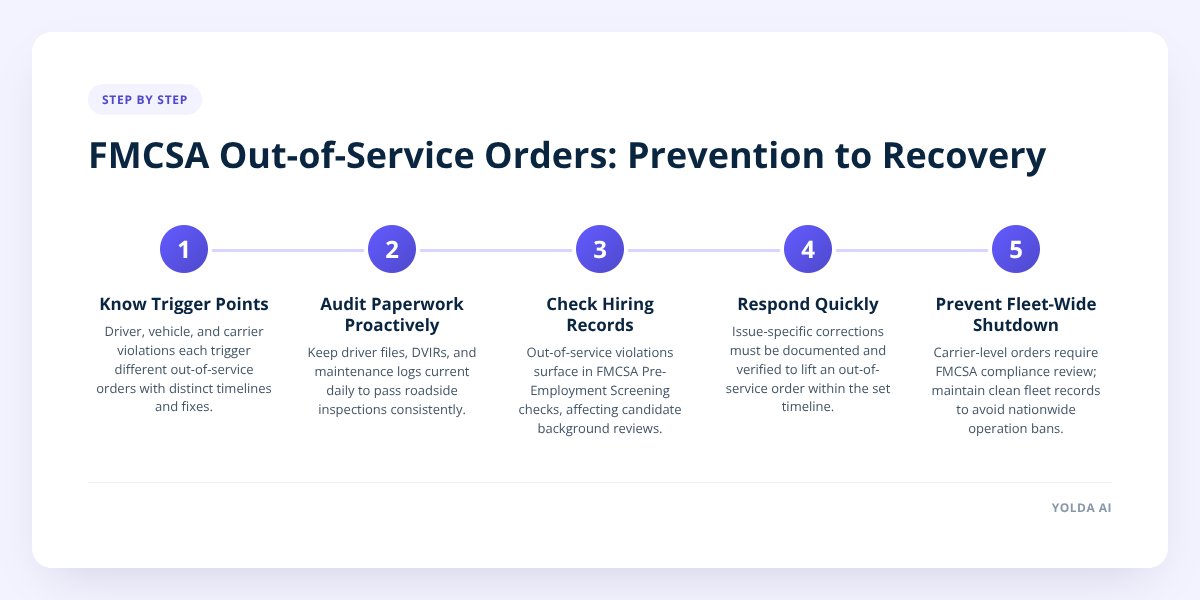
An out-of-service order gets issued at the roadside, and what triggers it depends on whether the inspector is looking at the driver, the vehicle, or the carrier as a whole.
Driver-level orders usually come from hours-of-service violations, an expired or missing medical certificate, driving under an invalid or suspended CDL, or failing an alcohol or drug test. The Federal Motor Carrier Safety Administration's North American Standard Out-of-Service Criteria spells out exactly which violations trigger this, and inspectors apply it uniformly across states.
Vehicle-level orders come from mechanical defects found during inspection — bad brakes, worn tires, lighting failures, steering or suspension problems, or cargo securement issues. A vehicle placed out of service cannot move until the defect is repaired and verified, and the inspector documents it right on the inspection report.
Carrier-level orders are the most serious. These follow a pattern of violations across the fleet, often after FMCSA issues an unsatisfactory safety rating during a compliance review. Unlike a single truck or driver being sidelined, a carrier-level order can shut down the entire operation until FMCSA is satisfied the underlying problems are fixed.
The distinction matters because the fix — and the business impact — is completely different at each level:
| Level | What triggers it | Immediate impact | Who can lift it |
|---|---|---|---|
| Driver | HOS violation, expired medical card, invalid CDL, failed drug/alcohol test | That driver can't operate until the issue is resolved | Driver + employer corrective action |
| Vehicle | Brake, tire, lighting, steering, or cargo defects found at inspection | That specific truck or trailer can't move until repaired | Repair verified by qualified mechanic |
| Carrier | Pattern of violations, unsatisfactory safety rating | Entire fleet may be barred from operating | FMCSA review and reinstatement process |
Step 2: Build a Pre-Inspection Checklist Inspectors Actually Use
Roadside inspectors follow a predictable pattern, and the three things they check first are driver qualification files, DVIRs, and maintenance logs. If those three are clean, most inspections end quickly.
A DVIR (driver vehicle inspection report) is the daily pre- and post-trip inspection record a driver files on a vehicle's condition. FMCSA requires carriers to keep these on file, and a missing or incomplete DVIR trail is one of the fastest ways to escalate a routine stop into something deeper.
Before any inspection — scheduled or not — run through this:
- Confirm every active driver has a current medical certificate on file and it isn't within 30 days of expiring.
- Verify each CDL is valid, unrestricted for the equipment being driven, and matches the vehicle class.
- Pull the last 7 days of DVIRs for every truck in service and check that defects noted were actually repaired and signed off.
- Check annual vehicle inspection stickers and confirm none has lapsed.
- Review the last 30 days of hours-of-service logs for unresolved violations or missing certifications.
- Confirm drug and alcohol testing records are current, including any random testing pool documentation.
- Verify insurance and registration documents in the cab match what's on file with the state and FMCSA.
- Check that cargo securement equipment (straps, chains, load bars) is present and within working condition.
Don't skip this: a single missing or outdated medical certificate is one of the most common reasons a driver gets placed out of service on the spot — and it's also one of the easiest things to prevent with a standing reminder system.
We cover the broader version of this process in How to Build a DOT Compliance Calendar for Your Fleet, which walks through setting up recurring reminders for every expiration date a fleet has to track.
Step 3: Understand How This Follows a Driver Into Hiring
An out-of-service violation doesn't disappear once the truck is back on the road — it becomes part of the driver's permanent safety record. FMCSA's Pre-Employment Screening Program (PSP) lets carriers pull a candidate's crash and inspection history, including any out-of-service violations, going back several years.
This creates two problems for hiring managers:
- Qualified-sounding candidates can carry hidden red flags. A driver with a clean résumé and a recent out-of-service violation for an hours-of-service infraction may not disclose it voluntarily, and a carrier that skips the PSP check won't catch it until after onboarding.
- Your own drivers become harder to retain if violations pile up. A driver who racks up multiple out-of-service events at your company becomes a liability on your CSA (Compliance, Safety, Accountability) scores, which follow the carrier, not just the individual.
This cuts both ways. If your company is the one accumulating violations, word travels in driver communities, and recruiting gets harder — experienced drivers avoid carriers with a reputation for rough equipment or shaky compliance. A clean inspection history is a hiring asset, not just a legal checkbox.
For fleets building out a formal screening process, a dedicated hiring pipeline that tracks PSP checks alongside applications — rather than juggling a spreadsheet and a separate records request — closes the gap between "looks qualified" and "actually cleared." Yolda's driver hiring and recruiting module keeps applications, pipeline stages, and qualification checks in one place so nothing slips through before a driver gets seated.
Step 4: Know the Recovery Timeline If You're Already Placed Out of Service
Recovery depends entirely on which level the order was issued at, but every path starts with the same first move: get the specific violation documented in writing before doing anything else.
For a driver-level order:
- Confirm the exact violation and the specific regulation cited on the inspection report.
- Resolve the underlying issue — renew the medical certificate, resolve the HOS log discrepancy, or complete required testing.
- Get documentation proving the fix (a new medical card, a corrected log, a clean test result).
- The driver typically returns to service once the documented condition is resolved — timelines vary by violation type, so confirm specifics with your state's FMCSA division office.
For a vehicle-level order:
- The vehicle stays out of service until the specific defect is repaired.
- A qualified mechanic must verify and document the repair.
- Some states require a re-inspection or a signed repair certification before the vehicle is cleared to return.
For a carrier-level order (following an unsatisfactory safety rating):
- FMCSA typically requires a corrective action plan — a written document showing exactly what the carrier is changing and by when.
- The plan addresses the specific deficiencies cited in the compliance review, whether that's driver qualification files, maintenance records, or HOS compliance patterns.
- FMCSA reviews the corrective action plan and may conduct a follow-up review before lifting the order.
- Full reinstatement can take weeks to months depending on the scope of violations — carriers should budget for an extended disruption, not a quick turnaround.
The current environment makes this more urgent than usual. Multi-state inspection campaigns — including recent Southeast sweeps and operations targeting specific high-violation corridors — have pulled a notable number of drivers and vehicles out of service in short windows. Fleets that treat compliance as a once-a-year audit rather than a daily habit are the ones getting caught in these sweeps.
Step 5: Reduce Inspection Risk With Daily Automation, Not Annual Audits
The fleets that avoid out-of-service orders aren't the ones with the newest trucks — they're the ones whose paperwork never has a gap. That means three things need to run continuously instead of periodically: DVIR submission, compliance date tracking, and driver record monitoring.
A DVIR app gives drivers a simple way to submit pre- and post-trip inspections from their phone instead of a paper pad that gets lost or filed late. Paired with a compliance calendar that watches every CDL, medical card, registration, and insurance expiration automatically, a fleet stops relying on someone remembering to check a spreadsheet.
This is the gap most DOT compliance software is built to close, and it's worth comparing options carefully — we laid out what to look for in DOT Compliance Software 101: What It Actually Manages. Yolda's safety and compliance module tracks the compliance matrix, DOT inspections with violation and out-of-service history, and watches CDL, medical card, registration, and insurance dates automatically — alerting the office before something lapses instead of after an inspector finds it.
If your fleet is weighing whether to add compliance tracking on top of existing dispatch and payroll tools, or consolidate everything onto one platform, that question is worth working through before committing — see 8 Questions Before Switching Trucking Software for a practical framework.
What to Do Next
Start with the pre-inspection checklist above this week, not after your next scheduled audit. Pull every driver qualification file, check the last two weeks of DVIRs, and confirm no medical card or CDL is within 30 days of lapsing.
If you're hiring, add a PSP check to every candidate before an offer goes out — it's a documented, standard part of the screening process and it catches problems a résumé won't show. And if your compliance tracking still lives in spreadsheets and a filing cabinet, that's the single biggest risk factor heading into the next inspection sweep.
Yolda runs dispatch, compliance, settlements, and hiring on one login, so a compliance date updates automatically wherever it matters instead of needing to be re-entered three times. Book a demo to see how the compliance tracking works with your current fleet size, or start a free trial to try it against your own driver files.
Checklist: Preparing for an FMCSA Inspection
- Confirm every active driver's medical certificate is current and not within 30 days of expiring.
- Verify each CDL is valid and matches the equipment class being driven.
- Pull the last 7 days of DVIRs and confirm noted defects were repaired and signed off.
- Check annual vehicle inspection stickers across the fleet for lapses.
- Review the last 30 days of hours-of-service logs for unresolved violations.
- Confirm drug and alcohol testing records and random testing pool documentation are current.
- Match insurance and registration documents in the cab against state and FMCSA records.
- Run a Pre-Employment Screening Program check on every new driver candidate before extending an offer.

