IFTA software that builds your quarterly IFTA report from the miles you ran.
Yolda totals miles and gallons by state from your ELD and fuel cards, applies the official rates for the quarter, and gives you an audit-ready IFTA worksheet to file with your base state, without a separate spreadsheet.
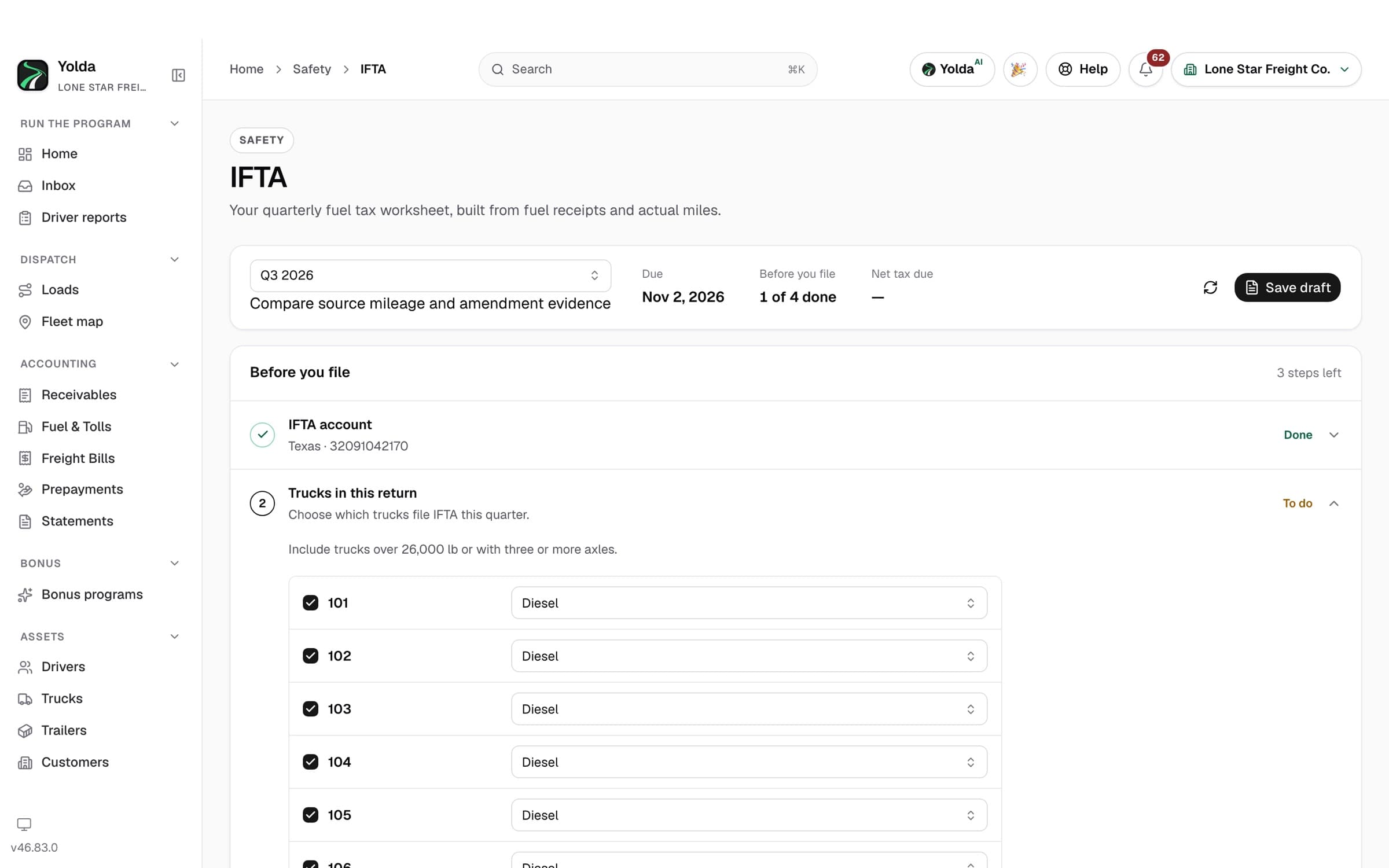
Enter your base state and IFTA account, and Yolda works out which trucks qualify: two axles over 26,000 lbs, three or more axles, or a combination over 26,000 lbs.
2
Miles come in by state
Samsara and Motive send their IFTA miles. TT ELD GPS points are turned into miles by state each night and labelled as an estimate for you to review. You can also import a file or enter trips by hand. The route a dispatcher planned is never counted as miles driven.
3
Gallons come in from fuel cards and receipts
Fuel card feeds, receipt photos from drivers and manual entries all land in the same fuel records, by state and by truck. Litres from Canadian stations are converted to U.S. gallons.
4
Check the quarter
A checklist shows what is missing before you rely on the numbers: a truck with no miles, fuel with no state, a rate that is not confirmed. Gaps are flagged, never filled with a guess.
From the Yolda demo. Lone Star Freight Co. and its data are made up.
5
Get the worksheet
Yolda calculates taxable miles, taxable gallons, fleet MPG and the tax or credit for every state and province, with late interest and penalty if the return is late. Save it as a PDF, plus a ZIP with the official rates and every source record behind it.
6
File it, then record it
File the return with your base state yourself or through your filing service, then record the filing date and confirmation number in Yolda so the quarter is closed on record.
IFTA software features
Built from miles and fuel you already have
IFTA trucking software that reads state miles from your ELD imports and trip records, and fuel from card feeds, receipts, and driver uploads already in your account. There's no separate IFTA spreadsheet to keep.
Every jurisdiction, split the right way
Actual miles and gallons are totaled per state, loaded and empty travel alike, and each state's line follows your base state's return. Alaska, Hawaii, and DC stay in fleet MPG but out of the tax lines.
Official rates, pinned to the quarter
Each quarter's official tax rates and surcharge lines are pinned to the report. Missing rates, mileage gaps, or unverified credits stay flagged for review — never silently rounded to zero.
An audit-ready worksheet, retained for years
Every quarter produces a branded IFTA worksheet (PDF/ZIP) with the source facts and the exact rates it used, kept at least four years. Correct a receipt later and Yolda produces a new version — it never rewrites history.
Rates watched for you
Yolda checks the official IFTA rate file every day and watches IFTA bulletins, so a rate change mid-quarter is flagged before you file, not found in an audit.
U.S. states and Canadian provinces
Every IFTA jurisdiction is covered, including the Canadian provinces, with each state's surcharge lines where they apply.
Who it's for
Owner-operators with their own authority
File your own quarter without a weekend of receipts. Need a quick number first? Try the free IFTA calculator.
Small and mid-size fleets
Every truck's miles and gallons in one quarter, from the ELD and fuel cards you already use. See connected ELDs and fuel cards.
Yolda produces the IFTA calculation and keeps it, but it is a worksheet, not a filed return. You or your filing service submit it to your base state. The same fuel and mileage records feed your trucking accounting software and each truck's weekly profit, so a gallon is recorded once and counted where it belongs.
Pricing
Every Yolda plan includes every module, with unlimited users and drivers. Plans are priced by the number of trucks you run, and self-serve plans start with a 30-day free trial with no credit card required to start.
Carriers that run qualified trucks across state lines file a quarterly IFTA return with their base state. It reports the miles driven and gallons bought in each state and province, and the fuel tax owed to or credited by each one.
Does Yolda file my IFTA return for me?
No. Yolda produces the quarterly IFTA worksheet, with miles, gallons and tax by jurisdiction at the official rates, and you file it with your base state. Recording the filing in Yolda only stores the date and confirmation number.
Where do the miles and gallons come from?
Miles come from Samsara, Motive, TT ELD and Reliable ELD, file imports and trip entries. Gallons come from fuel card feeds, receipts and manual entries. Planned load routes are never counted as miles.
What happens if I correct a receipt after the quarter closes?
Saving the quarter again creates a new version of the worksheet. The earlier version and the rates it used are kept, so your filing history stays intact.
Is there a free IFTA calculator?
Yes. The free IFTA calculator estimates the tax due or credit for one quarter from your miles and gallons by state. Yolda builds the full worksheet from your records.
How much does Yolda's IFTA software cost?
IFTA reporting is included in every Yolda plan. Plans are priced by truck count, from $99 a month for 1–5 trucks, with unlimited users and drivers. Self-serve plans start with a 30-day free trial, and no credit card is required to start.
Build your next IFTA quarter from the miles you ran.