
Quick answer: When your ELD and your dispatch software are connected, hours-of-service, location, and status update automatically on every load, so dispatchers see real driver availability instead of guessing. When they aren't connected, someone has to manually check the ELD, then re-type what they see into the dispatch board — and that gap is where missed hours violations, blown appointments, and double-booked drivers come from.
Key takeaways
- A connected ELD pushes hours-of-service and location data straight into dispatch — no one has to toggle between two screens or re-key numbers.
- Manual cross-checking between an ELD and a dispatch board typically happens once or twice a day at busy carriers, which means dispatch decisions are often made on hours-old information.
- The FMCSA's electronic logging device mandate, in place under 49 CFR Part 395, already requires most carriers to run an ELD — the question is whether that data reaches the people assigning loads.
- Yolda's dispatch workspace shows HOS status and live location on the fleet map straight from a connected ELD, so a dispatcher never has to ask a driver "how many hours do you have left?"
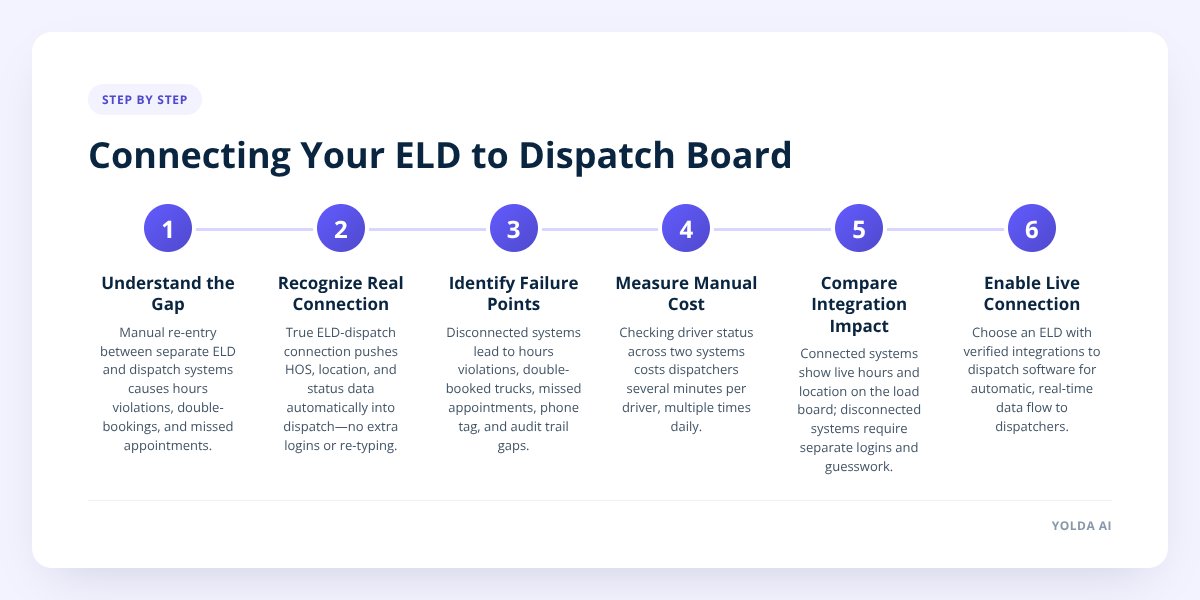
What Does It Mean for an ELD and Dispatch Software to Be "Connected"?
It means your electronic logging device (the hardware or app that records a driver's hours-of-service, required under the FMCSA ELD mandate) sends its data directly into your dispatch system, instead of living in its own separate app.
With a real connection, a dispatcher looking at a load board sees, without clicking anywhere else:
- The driver's current duty status — driving, on-duty, sleeper berth, or off-duty
- How many hours they have left before they hit their drive-time or on-duty limit
- Where the truck is right now, and often an ETA based on that location
- Whether a break or reset is coming up in the next few hours
Without that connection, every one of those facts lives in a separate ELD portal. A dispatcher has to log in, find the driver, read the numbers, and carry them back to the dispatch board by memory or by typing them into a note. That's not a connection — that's a second job.
What Actually Breaks When ELD Data Doesn't Flow Into Dispatch?
The most common failure is a load assigned to a driver who doesn't have enough hours left to legally run it. This happens constantly at carriers running a separate ELD portal and a separate dispatch tool, because the dispatcher is working off whatever they last checked — which might have been three hours ago.
Here's what tends to go wrong, in rough order of how often it happens:
- Hours violations. A dispatcher assigns a 400-mile run to a driver sitting at 6 hours remaining, because the dispatch board has no hours field and nobody checked the ELD first.
- Double-booked trucks. Two loads get assigned to the same driver because the board shows them as "available" when the ELD would have shown them still en route.
- Missed appointments. A shipper's dock window closes because the ETA on the board was based on yesterday's location, not a live GPS ping.
- Driver phone tag. Dispatchers call or text drivers to ask "where are you" and "how many hours do you have" — questions the ELD already answered, just not anywhere dispatch could see.
- Paper trail gaps. When a DOT audit asks for proof a load assignment matched available hours at the time, a carrier with two disconnected systems often can't reconstruct that timeline cleanly.
Don't skip this: assigning a load without checking current hours-of-service isn't just an efficiency problem — it's how carriers end up with HOS violations on their record, which feeds directly into a carrier's CSA score under FMCSA's Safety Measurement System.
How Much Time Does Manual Re-Entry Actually Cost?
It depends on fleet size, but the pattern is consistent: every driver whose status has to be manually checked adds a few minutes of dispatcher time, multiple times a day. A dispatcher running 15 trucks who checks each driver's hours twice a day, at roughly two minutes per check, is spending close to an hour a day just moving numbers from one screen to another — time that isn't spent planning routes, chasing freight, or talking to customers.
The bigger cost isn't the minutes. It's the lag. A dispatcher working off a status check from this morning doesn't know a driver ran into traffic, took an early break, or is sitting at a shipper waiting on a dock. By the time that information makes it onto the dispatch board — if it makes it there at all — the plan built around it is already out of date.
Connected vs. Disconnected: What Changes for a Dispatcher
| ELD and dispatch connected | ELD and dispatch separate | |
|---|---|---|
| Driver hours visible on the load board | Yes, updated automatically | No — requires a separate login to check |
| Location and ETA | Live, from the driver's device | Based on last check-in or driver call |
| Assigning a load near a driver's hour limit | System shows remaining hours before assignment | Dispatcher guesses or calls the driver |
| Proving HOS compliance during an audit | Timeline reconstructs from one system | Requires piecing together two systems' records |
| Dispatcher's daily status-check time | Minimal — data is already there | Several minutes per driver, multiple times a day |
Which ELDs Can Actually Feed a Dispatch Board Today?
Not every ELD-to-TMS claim online reflects a working, live connection — it's worth confirming with your software provider which integrations are actually live versus "coming soon." Yolda currently has working, live connections with Samsara, Motive, Reliable ELD, MAX ELD, and TT ELD, meaning hours-of-service and location from those devices flow into the dispatch board automatically, with no manual re-entry. If your fleet runs one of these, the connection already works; if you're on a different device, ask directly whether that integration is live before assuming it is.
This matters more than it might seem, because an ELD-dispatch connection that only partially works — say, it shows location but not hours, or updates once an hour instead of in real time — can be worse than no connection at all. A dispatcher who trusts a stale number is making the same mistake as one working off no number, just with more false confidence.
What About Carriers Still Running Paper Logs or an Unsupported ELD?
If your ELD isn't connected to your dispatch system yet, the fix isn't necessarily buying new hardware — it's checking whether your current ELD has a working integration with your TMS, or whether your TMS has one with your ELD. Swapping ELDs is disruptive and sometimes unnecessary if the dispatch side is the piece that needs to change.
A few things worth checking before assuming you need new equipment:
- Confirm which ELDs your dispatch software actually integrates with today, not which ones are planned
- Ask whether the integration pushes hours-of-service, location, or both — some only do one
- Check how often the data updates — once a day isn't the same as real time
- Find out whether the connection requires each driver to also use a separate driver app, or whether it's seamless
If you're still evaluating which dispatch platform fits your fleet at all, our buyer's guide to choosing trucking dispatch software walks through what to look for beyond just ELD integration. And if the terms themselves — ELD, TMS, DVIR — are getting mixed up in conversations with your team, the trucking software glossary is a quick reference worth bookmarking.
Ready to Stop Checking Two Screens?
An ELD that talks to your dispatch board isn't a convenience feature — it's the difference between a dispatcher who knows what's actually happening on the road and one who's working off a guess. Yolda connects live with Samsara, Motive, Reliable ELD, MAX ELD, and TT ELD, so hours-of-service and location show up right on the dispatch board where loads get assigned — no separate login, no manual re-entry. Book a demo to see it running against your own ELD data, or start a free trial to try it with your fleet.
Checklist: Connecting Your ELD to Your Dispatch Board
- Confirm which ELD your fleet currently runs on every truck.
- Check whether your dispatch software lists that ELD as a live integration, not "coming soon."
- Ask your provider whether the connection pushes both hours-of-service and live location.
- Verify how frequently the data refreshes on the dispatch board.
- Test the connection with one truck before rolling it out fleet-wide.
- Train dispatchers to check the board first, instead of calling drivers for status updates.
- Review your HOS violation history for patterns tied to manual status checks.
- Confirm drivers don't need a second app running alongside the ELD for the data to reach dispatch.


