
Quick answer: An IFTA sticker (officially an IFTA decal) is proof that your truck is registered under the International Fuel Tax Agreement, and you need two of them — one on each side of the cab — if you run a qualified motor vehicle across state lines. You get them by applying for an IFTA license through your base state's revenue or transportation department, usually for a small per-set fee, and they're valid for the calendar year. Drive without them and you risk a citation, a trip permit purchase at the scale, or worse at an inspection.
Key takeaways
- A qualified motor vehicle is one with two axles and a gross or registered gross weight over 26,000 lbs, three or more axles at any weight, or a combination over 26,000 lbs — that threshold applies the same way it does for IRP registration.
- Decals are issued in pairs per truck, cost a modest fee per set (check your base state's current schedule), and expire December 31 each year.
- Most IFTA jurisdictions offer a grace period into the new year — often through the end of February — to display new decals, but your base state sets the exact date, so confirm it directly.
- Running without a current decal and without a valid trip permit can mean citations in every state you cross, not just your base state.
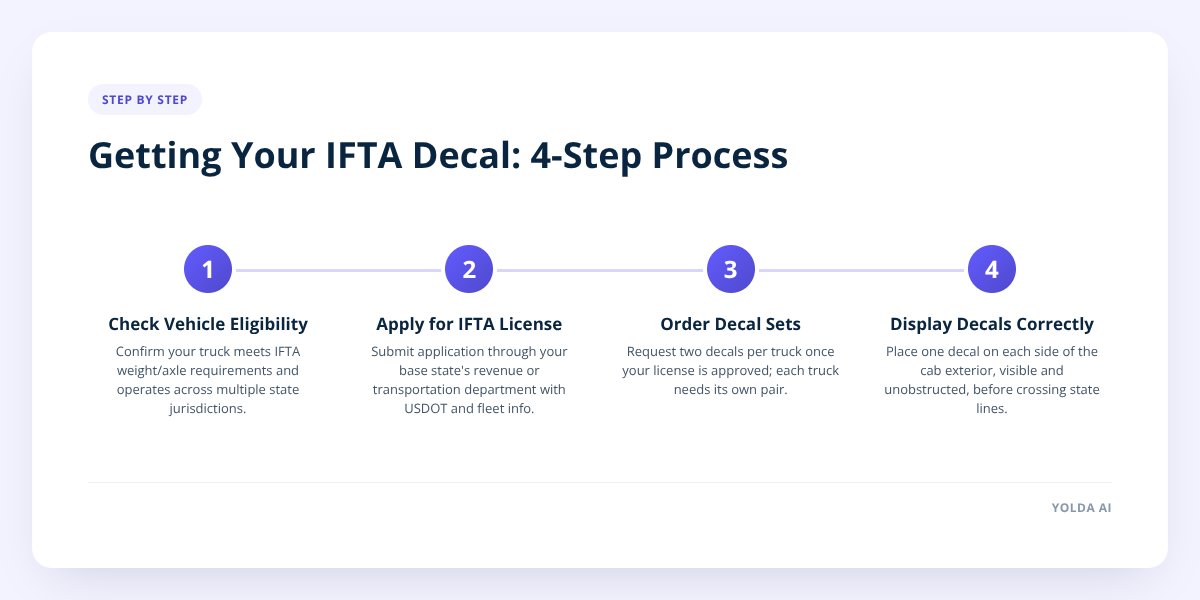
Step 1: Figure out if your truck actually needs one
You need an IFTA license and decals if you operate a qualified motor vehicle in interstate commerce across two or more member jurisdictions. The weight and axle test is specific: two axles with a gross or registered gross weight over 26,000 lbs, three or more axles regardless of weight, or a combination (truck plus trailer) with a combined weight over 26,000 lbs.
This is the same threshold used for IRP apportioned registration, and it's worth noting it doesn't automatically mean you need a CDL. Under 49 CFR 383.91, a truck under 26,001 lbs GVWR towing a trailer rated 10,000 lbs GVWR or less can run without a CDL even though it clears the IFTA weight line — that's the legal non-CDL hot shot setup, covered in more detail in our hot shot trucking overview. A trailer rated over 10,000 lbs combined with a GCWR of 26,001 lbs or more does need a Class A license.
Vehicles that stay entirely within one state never need IFTA at all — the agreement only applies to multi-jurisdiction travel. If you run local routes exclusively, skip the rest of this and confirm with your state whether any other state fuel tax filing applies to you.
Step 2: Apply for your IFTA license before you apply for decals
The decal is not something you buy on its own — it's issued after your base state approves your IFTA license application. Your base jurisdiction is the state where your vehicles are registered, where you keep your operational records, and where you actually travel.
To apply, you'll typically go through your state's department of revenue, department of transportation, or motor carrier services division — the exact agency varies by state. The application asks for your USDOT number, business details, and fleet information.
Don't skip this: you must apply through the single state where your trucks are based and your records live — you cannot shop around for a different base state's license just because its fees or deadlines look more convenient. IFTA member jurisdictions define base state by your legal residence and where your operational control and records are maintained, not by driver preference.
If you're not sure your business is even set up correctly to register for IFTA yet, our post on what a USDOT number is covers the piece that usually comes first.
Step 3: Order the right number of decals — two per truck, not per fleet
Once your license is approved, you order decal sets separately for each qualified vehicle in your fleet. Each set is two decals: one for the left side of the cab, one for the right. You cannot photocopy, laminate a printout, or share one decal across multiple trucks — each physical truck needs its own two-decal set.
| Item | Detail |
|---|---|
| Decals per truck | 2 (one per side of cab) |
| Issued by | Your base state's IFTA office |
| Valid period | Calendar year (expires Dec 31) |
| Renewal window | Opens in the fall, before year-end |
| Grace period to display new decals | Typically into early the following year — confirm your state's exact cutoff |
| Cost | A modest per-set fee set by your base state — confirm the current amount directly |
Fleets that add trucks mid-year need to order decals for each new unit before that truck crosses a state line — the decal follows the truck, so a new lease or purchase means a new order, not a transfer from a retired unit.
Step 4: Display the decals correctly on every truck
Place one decal on the lower exterior portion of each side of the cab, where it's clearly visible and not obstructed by mud flaps, ladders, or other equipment. Most states specify it should go on the cab exterior — check your base state's instructions for exact placement language, since some add detail about position relative to the door.
A few practical rules that trip up new fleets:
- Replace a decal immediately if it's torn, faded past legibility, or peeled halfway off — an inspector who can't read the year on a decal treats it as missing.
- Keep a copy of your IFTA license (the paper, not the decal) in the cab at all times — decals prove registration, but roadside officers often ask for the license document too.
- Order new decals before the current year's sticker's grace period ends, not after — processing and mail time eats into that window faster than most owners expect.
- Never move a decal from one truck to another, even temporarily — each is tied to a specific vehicle on your license.
- Keep decals on retired or sold trucks removed, since a buyer running your old sticker is a liability for both of you.
Step 5: Renew before the deadline — and know what happens if you miss it
Renew your IFTA license and order new decals each fall, before the calendar year ends, so new decals arrive and get installed before the old ones expire. Most jurisdictions build in a grace period — commonly through the end of February — during which trucks can still display the prior year's decal while new ones are in transit. That date is set by each base jurisdiction, so confirm yours rather than assuming it matches a neighboring state.
Miss the window entirely, and you have two options: buy a trip permit for each state you need to cross (an added cost and paperwork burden per trip), or keep the truck parked until decals are sorted. Running without either a current decal or a valid trip permit risks a citation in every jurisdiction the truck enters — not just your home state — plus potential fines and delays at weigh stations.
This is also where record-keeping starts to matter as much as the sticker itself. A truck with a valid decal but sloppy mileage-by-state logs is still exposed come filing season — we've covered what that exposure looks like in what happens in an IFTA audit, step by step.
Step 6: Connect the decal to the paperwork it triggers
Getting the sticker on the truck is the easy part — the decal is really just the visible marker of an ongoing quarterly reporting obligation. Every qualified vehicle displaying an IFTA decal has to be part of your quarterly fuel tax return, tracking miles and fuel purchased by state.
This is where a lot of small fleets fall behind: the decal goes up in January, and by the first quarterly filing deadline, nobody's been logging which state each gallon was bought in. If you're still doing this by hand or spreadsheet, how to track fuel purchases by state without a spreadsheet walks through the manual pain points before they become an audit problem.
Yolda's IFTA reporting module handles this part directly — fuel purchases and mileage get tied to the right truck and jurisdiction automatically, so your quarterly return reflects the same trucks you've got decals on, without reconstructing records from receipts in a shoebox.
What to do next
Start with the license, not the sticker — you can't order decals until your base state approves your IFTA application. Once decals arrive, get them on the cab the same week, log the expiration date somewhere you'll actually see it, and set a renewal reminder for early fall so you're never racing the grace period.
If your fleet has grown past the point where sticky notes and spreadsheets track decal expirations and quarterly fuel data reliably, it's worth seeing how Yolda handles IFTA reporting alongside dispatch and driver pay in one place — you can see the product with a demo or start a free trial.
Checklist: Getting your IFTA sticker and keeping it current
- Confirm your truck meets the qualified motor vehicle weight or axle threshold.
- Apply for an IFTA license through your base state's revenue or transportation department.
- Gather your USDOT number and fleet details before you start the application.
- Order one decal set per qualified truck once your license is approved.
- Install one decal on each side of the cab exterior, in a clearly visible spot.
- Keep a copy of your IFTA license paperwork in the cab at all times.
- Mark your renewal deadline each fall and reorder before the grace period ends.
- Remove decals from any truck you sell or retire from your fleet.
- Set up mileage and fuel tracking by state so your quarterly filing matches your decals.


