
Quick answer: Yolda fits small fleets by matching its modules to how each operation actually runs its day — hot shot haulers need fast rate-con-to-dispatch and quick invoicing, box truck operators need driver-app photo proof of delivery, power-only carriers need clean documents and settlements without equipment headaches, and growing owner-operators need the same system to scale from one truck to many without switching platforms. There's no separate "small fleet" product — it's the same modules, licensed month-to-month, used differently depending on what you haul and how.
Key takeaways
- A non-CDL hot shot setup is a truck under 26,001 lbs GVWR towing a trailer rated 10,000 lbs GVWR or less, per 49 CFR 383.91. A truck rated 26,001 lbs or more needs a Class B CDL; a trailer rated over 10,000 lbs in a combination rated 26,001 lbs or more needs Class A.
- IFTA and IRP apply to any vehicle crossing state lines with two axles over 26,000 lbs, three-plus axles at any weight, or a combination over 26,000 lbs.
- Yolda runs on month-to-month licensing with every module, every AI feature, and unlimited users included on every tier — no per-user fees or add-ons.
- DAT and Truckstop load board connections are listed as coming soon on Yolda's integrations page, not live today — confirm current status before you rely on either.
Hot Shot Trucking: What Actually Eats Your Time Every Day
A hot shot operator's day lives and dies by three things: how fast you can turn a rate confirmation into an accepted load, whether your paperwork is actually attached when you need it, and how long it takes to get invoiced and paid after delivery. Miss any one of those and you're either sitting on a load you could've taken, or chasing a document three days after the fact.
Hot shot loads often come from different brokers, each with its own rate con format. Retyping rate, stops, and reference numbers into a dispatch board for every single one adds up to real time lost, especially when you're also driving.
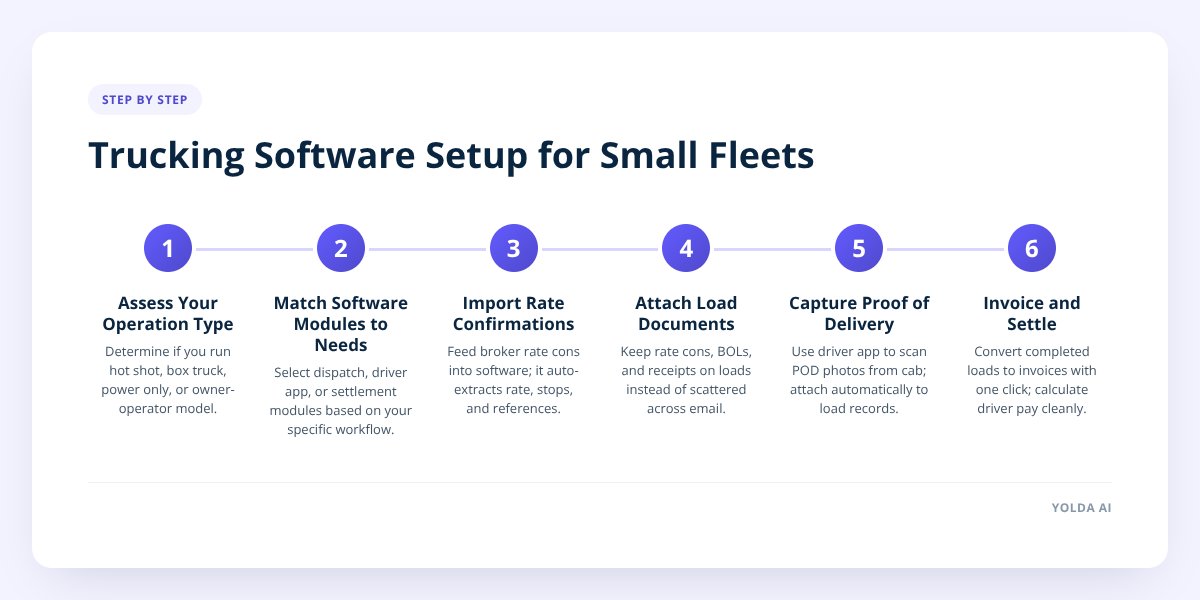
Yolda's dispatch handles that pattern: drop in the rate confirmation and Yolda reads it, pulling the rate, stops, and reference numbers into a load draft for you to approve. Documents — the rate con, BOL, and any receipts — then live on the load itself instead of scattered across email and text threads. Once the load delivers, one click turns it into an invoice with nothing re-typed.
A quick note on the legal setup many hot shot operators run: a truck under 26,001 lbs GVWR towing a trailer rated 10,000 lbs GVWR or less doesn't require a CDL under 49 CFR 383.91. A trailer rated over 10,000 lbs in a combination rated 26,001 lbs or more puts you in Class A CDL territory, and a truck that is itself rated 26,001 lbs or more needs a Class B CDL. USDOT and medical card requirements can still apply in interstate commerce regardless of which side of that line you're on.
IFTA and IRP registration follow a separate test: they apply to a vehicle crossing state lines with two axles and a gross or registered gross weight over 26,000 lbs, three or more axles at any weight, or a combination over 26,000 lbs. A lot of hot shot rigs sit right at that line, so it's worth checking your actual configuration against both the CDL rule and the IFTA/IRP rule separately — they don't move together. If you're newer to the business model, the hot shot trucking overview walks through the setup basics.
Box Truck Operations: Proof of Delivery Without the Phone Tag
A box truck operator's biggest daily friction point is usually proof of delivery — getting a clean photo of the signed POD back from the driver before the customer calls asking where it is. Chasing a driver by text for a photo, then forwarding it to whoever handles invoicing, adds a delay that shows up directly in your cash flow.
Yolda's driver app solves this at the source: the driver scans the POD from the cab, it lands on the load automatically, and the driver's pay for that load waits until the team approves the POD. That approval step matters — it means nobody gets paid for a delivery nobody's confirmed, but it also means the document is sitting where dispatch and accounting can both see it immediately, instead of buried in a phone's camera roll.
Most box truck freight also runs under the same weight-based rules as any other commercial vehicle. Many box trucks fall under 26,000 lbs GVWR and don't trigger IFTA or IRP registration on weight alone — but if you're running a combination (box truck plus trailer) over 26,000 lbs, or operating in interstate commerce with three or more axles, the IFTA/IRP threshold applies regardless of single-unit weight. If you're building out a box truck operation from scratch, how to start a box truck business covers the setup questions this post doesn't.
Power Only: The Documents-and-Settlements Problem
Power only carriers haul someone else's trailer with their own tractor. There are no trailers of your own to manage, but the paperwork and pay side still needs to be tight: rate cons, documents and settlement cycles for every load.
The daily needs break down into three things:
- Rate confirmations need to turn into dispatched loads fast.
- Load documents — rate con, BOL, any accessorial paperwork — need to stay attached to the load, not loose in email.
- Driver settlements need to calculate cleanly off the loads actually run that week, with deductions applied correctly.
Yolda's driver settlement software handles the last piece directly: pick a driver and Yolda writes their weekly settlement statement from the loads they ran that week. Approve it, and it goes out by email — no manual tally of load pay against deductions. If you're running mixed pay structures (some owner-operators on percentage, some on a per-mile rate), the differences in how those settlements calculate are covered in Owner-Operator vs Company Driver Settlement Calculations.
Owner-Operator Growing to a Fleet: Does the Software Actually Scale?
Yes — the same modules that run a single truck run a thousand, because Yolda isn't a different product at different sizes, just the same system with more trucks and drivers in it. That matters because switching software mid-growth is expensive: you re-enter driver data, retrain on a new dispatch screen, and usually lose historical records in the move.
The practical scaling questions an owner-operator should ask before adding a second truck:
- Will I need a new dispatcher workflow, or does the same one work for two trucks? Yolda's dispatch board and rate-con reading work the same whether there's one truck or many.
- Do I need to buy a separate compliance tool as I add drivers? Yolda's safety and compliance module tracks CDL, medical card, registration, insurance, and inspection dates automatically and alerts before any one lapses — the same watch list whether you have one driver or twenty.
- Will adding drivers mean paying per seat? On Yolda, every module, every AI feature, and unlimited users are included on every tier, so adding a driver doesn't trigger a new fee tier.
- Can I migrate my existing records instead of starting over? Yolda migrates drivers, trucks, customers, and historical data before the switch, with a dedicated migration team on the enterprise tier.
If you're still setting up the business itself, how to start a trucking company walks through authority, insurance and registration step by step.
Don't skip this: licensing is month-to-month on every tier, with no contract — so there's no long-term commitment to test whether the system actually fits before you scale up on it.
Matching Your Operation to the Right Feature
Here's how the four operation types line up against daily priorities and the Yolda feature built for each one:
| Operation type | What matters most daily | Yolda feature that handles it |
|---|---|---|
| Hot shot | Fast rate-con-to-dispatch, quick invoicing | Dispatch: reads rate cons, builds load drafts, one-click invoicing |
| Box truck | POD photos, dispatch accuracy | Driver app: POD scanning from the cab, pay gated on approval |
| Power only | Clean documents, accurate settlements | Driver settlements: statements built from the loads run |
| Owner-op to fleet | Scaling without re-platforming | Full module set at every tier, month-to-month, migration included |
A Note on Load Boards: What's Live and What Isn't
DAT and Truckstop load board connections are not available in Yolda today — they're listed as coming soon on the integrations page. What is live today includes QuickBooks Online, Stripe, and spreadsheet export; toll systems like PrePass, Bestpass, and E-ZPass; fuel cards including EFS, Comdata, and WEX; and ELD connections with Samsara, Motive, Reliable ELD, MAX ELD, and TT ELD.
If your current workflow depends heavily on pulling loads directly from a board into your TMS, confirm the current integration status before you switch — a feature "coming soon" today may or may not be live by the time you need it, and it's worth checking the integrations page directly rather than assuming. If you're also weighing whether a full TMS or a lighter dispatch tool fits your operation better, TMS Software vs Dispatch Software: Differences breaks down that distinction.
What to Do Next
Start by identifying which of the four operation patterns above matches your daily reality — most small fleets are a close match to one, even if they haul a mix of freight types. From there, the feature that solves your actual daily bottleneck (rate-con speed, POD capture, settlement accuracy, or scaling without re-platforming) is the one worth testing first.
You can try it directly with a free trial at yolda.ai/signup, or you can book a walkthrough at yolda.ai/demo to see how your specific operation type would run on it before committing to anything.
Checklist: Matching Your Fleet Type to the Right Software Setup
- Confirm your truck and trailer weights against the CDL threshold (49 CFR 383.91) before assuming you're non-CDL.
- Check your combination weight against the IFTA/IRP threshold separately — it's not the same test as the CDL rule.
- List your current daily bottleneck: rate-con delay, missing POD, slow settlement, or scaling friction.
- Review Yolda's integrations page for what's live today versus coming soon before you rely on a specific connection.
- Gather your driver roster, trucks, and historical records if you're planning a migration from another system.
- Test the module that matches your bottleneck first, rather than trying to adopt everything at once.
- Confirm current licensing terms and tier details on the pricing page before you commit.


