
Quick answer: Most IFTA errors come from five repeatable mistakes — fuel purchase misallocation, mileage rounding, missed state-line transitions, duplicate entries, and date-shift errors — and they're almost always caught by comparing your reported fuel and mileage against your ELD trail and fuel card statements, state by state, before you file. Fix them pre-filing with amended totals; fixing them after a jurisdiction flags you during audit costs more in penalties and interest, and it invites a closer look at your other quarters.
Key takeaways
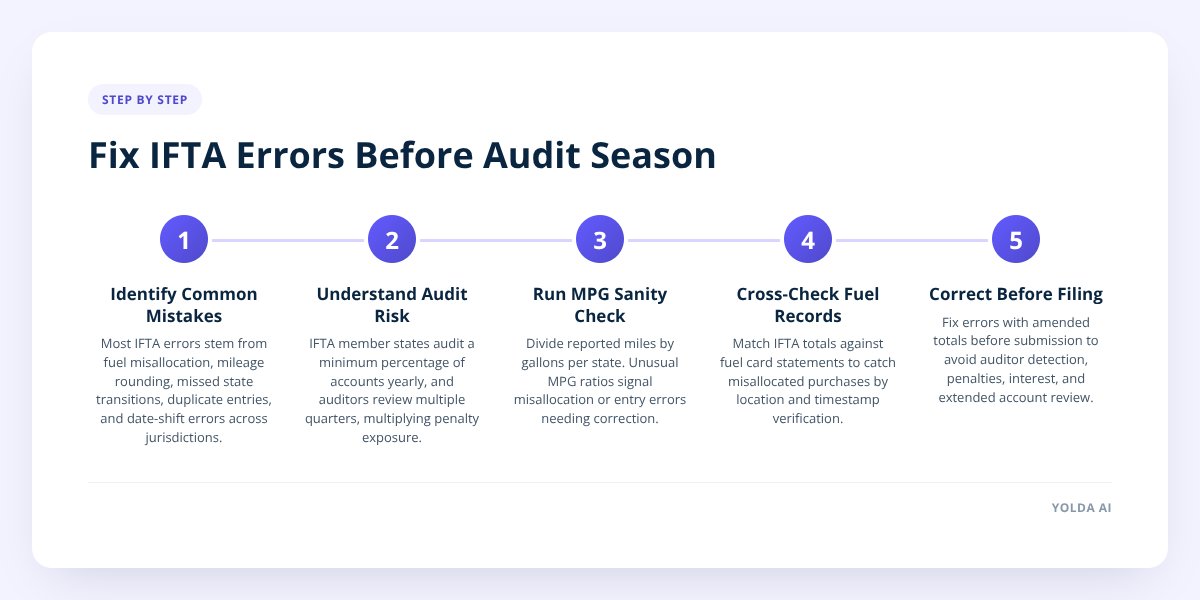
- The five most common IFTA mistakes — fuel misallocation, mileage rounding, missed state transitions, duplicate entries, and date-shift errors — compound across jurisdictions because each state's fuel tax rate differs, so a small error multiplies differently depending on where it lands.
- A state-by-state miles-per-gallon sanity check (reported miles ÷ reported gallons, compared against your truck's real-world MPG) catches most data errors in minutes, according to the methodology the International Fuel Tax Association outlines for base jurisdiction audits.
- Cross-checking your IFTA return against fuel card statements and bank records before filing is the single fastest way to catch misallocated purchases, since fuel cards already tag the purchase location and amount.
- Member jurisdictions under the IFTA Articles of Agreement can audit at least 3% of a base jurisdiction's accounts per year, which means every carrier filing quarterly is a live candidate, not just the ones that look suspicious.
Why IFTA errors cost more the longer they sit
A reporting error found before you file costs you a corrected spreadsheet. The same error found by an auditor six months later costs penalties, interest, and a longer look at every other quarter you've filed.
The International Fuel Tax Association (IFTA, Inc.), which governs the agreement across member U.S. states and Canadian provinces, requires base jurisdictions to audit a minimum percentage of registered carrier accounts each year as part of maintaining the agreement's integrity. That means audit selection isn't purely complaint-driven or random-flag-driven — a baseline share of fleets gets reviewed every single year, regardless of how clean their filings look on the surface.
Once an auditor opens your account, they're not just checking the quarter in question. Most jurisdictions document multi-quarter review periods, often reaching back several years, which means one error pattern — say, consistently rounding mileage the same way — can surface in every return you've filed since you started the habit.
Don't skip this: An error caught and corrected before filing is a non-event. The same error caught during an audit can trigger penalty and interest assessments on top of the tax owed, and it puts every other quarter you've filed under the same microscope.
The fix isn't filing faster. It's building a short review step into every quarter so the error gets caught by you, not by the state.
The 5 IFTA mistakes that show up in almost every audit
These five account for the overwhelming majority of correction requests fleets file, and they tend to show up together because they share a root cause: manual data entry under time pressure.
- Fuel purchase misallocation. A driver fuels up in Ohio but the purchase gets logged against Indiana because that's where the load picked up, or because a dispatcher batch-entered receipts by trip instead of by actual fuel stop. Each gallon needs to be credited to the state where it was physically purchased — nowhere else.
- Mileage rounding. Rounding 487 miles to "about 500" feels harmless on one trip. Across a quarter and a dozen states, rounding habits almost always skew in one direction, and that skew shows up as a mismatch between reported miles and what your ELD or routing data actually recorded.
- Missed state transitions. A route that clips the corner of a state for 20 miles is easy to miss if nobody's tracking it closely, especially on runs that cross three or four state lines in a single day. Every mile driven in a jurisdiction is taxable in that jurisdiction, even if the truck barely touched it.
- Duplicate entries. Fuel receipts get entered once by a driver through a mobile app and again by the back office from a card statement. Nobody notices until the total gallons purchased is suspiciously higher than the tank capacity could support.
- Date-shift errors. A fuel purchase made at 11:40 PM on the last day of a quarter gets logged with the following day's date, shifting it into the wrong filing period entirely. This one is easy to miss because the receipt date and the system entry date aren't always the same thing.
Here's why they compound: IFTA isn't one tax rate, it's a different rate per jurisdiction, recalculated every quarter. A misallocated 200 gallons from a low-tax state to a high-tax state doesn't just move the gallons — it changes your net tax liability in both jurisdictions at once, and it does so in different directions depending on the quarter's rate table.
How to audit your own IFTA data before you file
Run this as a standing step every quarter, not just when something looks off. It takes under an hour for a small fleet and catches the overwhelming majority of entry errors.
Step 1: Run the miles-per-gallon sanity check, state by state. Divide reported miles by reported gallons for each jurisdiction on your return. If a truck that normally gets 6.5 MPG shows 11 MPG in one state and 3 MPG in another, you've got a misallocation or a mileage error — trucks don't get dramatically better or worse mileage because of which state they're in.
Step 2: Cross-check fuel totals against your fuel card statement. Your fuel card provider already records the purchase location, gallons, and price per gallon with a timestamp. Pull that statement and match it line by line against what's in your IFTA worksheet — any fuel card transaction that doesn't have a matching IFTA entry, or vice versa, is either a duplicate or a missing purchase.
Step 3: Reconcile against your bank statement for cash or non-card purchases. Not every fuel stop goes through a card. If drivers front cash for a diesel lane purchase and submit a receipt, check that it actually made it into the fuel log — these are the purchases most likely to get missed or double-entered.
Step 4: Pull your ELD mileage report and compare it to reported miles per jurisdiction. Your ELD already has a GPS-based breakdown of miles driven per state. If your manually reported mileage differs by more than a small margin from the ELD's jurisdiction breakdown, trust the ELD and investigate the gap.
Step 5: Check purchase dates against the filing period boundary. Pull any fuel purchases made in the last 48 hours of the quarter and confirm they landed in the correct filing period. This single check catches most date-shift errors before they become a cross-quarter mismatch.
If you want a deeper walkthrough of estimating your liability as you go — useful for catching errors before the quarter even closes — we've covered that in How to Forecast Your Quarterly IFTA Bill Before It's Due.
What should catch these errors automatically — and what still needs a human
A capable IFTA software tool should flag jurisdiction mismatches, duplicate entries, and mileage outliers the moment data is entered, not weeks later when you're assembling the return. Here's a practical split of what automation should handle versus what still needs eyes on it:
| Error type | Should be caught automatically | Still needs manual review |
|---|---|---|
| Fuel misallocation | Yes — flagged when purchase location doesn't match route | Confirm the correct jurisdiction when a stop is near a state line |
| Mileage rounding | Yes — flagged when manual entry drifts from GPS/ELD mileage | Approve the discrepancy or correct the entry |
| Missed state transitions | Partial — only if route data is pulled from GPS, not self-reported | Verify short in-and-out transitions on multi-state routes |
| Duplicate entries | Yes — flagged when two entries share amount, date, and location | Decide which entry is correct if details genuinely differ |
| Date-shift errors | Partial — only if the system timestamps entry vs. purchase separately | Confirm the actual purchase date against the receipt |
This is where the gap between a spreadsheet and purpose-built IFTA software shows up most clearly. Yolda's IFTA reporting module calculates your quarterly fuel tax from fuel and mileage data already tied to the load and the route — so a fuel purchase logged against a jurisdiction the truck never actually drove through gets caught before it becomes a line on your return, not after. We've also written about the broader set of checks a solid IFTA calculator should run automatically.
Automation won't replace judgment entirely. A software flag telling you "mileage doesn't match route" still needs a person to decide whether the driver took a legitimate detour or whether it's a data entry mistake. Treat automated flags as a shortlist to review, not a final answer.
A pre-filing checklist: timing, sign-off, and when to call a tax advisor
Build this into your filing calendar so it happens the same way every quarter, not as a scramble in the final week.
Timing that works:
- Run your data pull and sanity checks 10–14 days before the filing deadline, giving yourself room to chase down discrepancies.
- Reconcile fuel card and bank statements at least a week out — these take the longest if something doesn't match.
- Leave the final 2–3 days for sign-off and submission only, not for discovering new problems.
Who should sign off:
- The person who entered the data should not be the only person who reviews it — a second set of eyes catches patterns the original entrant is blind to.
- Whoever owns the fleet's P&L should see the final liability number before it's filed, since a sudden swing from last quarter is often the first sign something's wrong.
When to loop in a tax advisor:
- If you're correcting more than one or two prior quarters at once, a tax advisor can help you sequence the amendments correctly.
- If an audit notice has already arrived, get a tax advisor or accountant involved before you respond — amended filings submitted under audit pressure carry different risk than routine corrections.
- If your fleet just crossed into new jurisdictions for the first time, a short advisor consult on registration requirements can prevent an entirely different category of error next quarter.
If prices swung hard mid-quarter and your fuel totals look off because of that rather than entry error, that's a different problem with its own fix — we walk through it in How to File IFTA When Fuel Prices Swing Mid-Quarter.
Getting ahead of IFTA errors is mostly a matter of making the review step routine instead of optional. Yolda builds that review into the filing process itself, calculating your quarterly fuel tax from the same route and fuel data your dispatch and accounting already run on — so the numbers match before you ever hit submit. If your fleet is still reconciling IFTA by spreadsheet every quarter, book a demo and see what a built-in IFTA reporting workflow looks like.
Checklist: catching IFTA errors before you file
- Pull your fuel card statement and match every transaction to a corresponding IFTA entry.
- Run the miles-per-gallon check for each jurisdiction and flag any MPG that's far outside your truck's normal range.
- Compare manually reported mileage against your ELD's GPS-based jurisdiction breakdown.
- Check fuel purchases made in the last 48 hours of the quarter for date-shift errors.
- Reconcile cash or non-card fuel receipts against the fuel log to catch missing or duplicate entries.
- Review short state-line transitions on multi-state routes to confirm no jurisdiction got skipped.
- Have a second person review the final numbers before anyone signs off.
- Flag any quarter where the liability swings sharply from the prior quarter for extra review.
- Loop in a tax advisor before amending more than one prior quarter at once.

