
Quick answer: Run an IFTA audit at three points mid-quarter — around day 15, day 35, and day 44 — instead of waiting until the filing deadline. Diesel price swings don't change your mileage or jurisdiction split, but they change how fast a small gallon-reporting error turns into a real tax discrepancy, and catching it early is the only way to fix it without filing an amended return.
Key takeaways
- The International Fuel Tax Agreement sets quarterly filing deadlines on the last day of the month following quarter-end — for example, Q3 (July–September) is due by October 31, according to IFTA Inc., the organization that administers the agreement.
- A mismatch between reported gallons and actual fuel-card purchase records is the most common trigger for a jurisdiction audit flag, not the tax rate itself.
- Checking your numbers at three checkpoints — roughly days 15, 35, and 44 of a quarter — gives you time to fix a data problem before it becomes a filing problem.
- Most IFTA penalties come from late or incomplete filings, not from honest mileage estimates — so a timeline problem is often more costly than a math problem.
Why Waiting Until the Deadline Is the Riskiest Habit in IFTA Filing
Filing IFTA at the last minute turns a data-entry issue into a deadline crisis. When diesel prices swing hard mid-quarter — which has been a recurring story this year as refinery outages pushed pump prices up faster than crude oil costs — fleets that only look at their numbers once, right before the due date, lose their only chance to catch and fix an error calmly.
Here's the mechanic that makes this dangerous. IFTA doesn't tax you on fuel price — it taxes you on fuel consumed per jurisdiction, calculated from miles driven and miles-per-gallon. But price volatility changes driver and dispatcher behavior: drivers top off more at cheaper truck stops across state lines, fuel cards record purchases in a different state than where the truck actually burned the fuel, and manual mileage splits get rushed when everyone is focused on the bigger expense story. The result isn't a tax-rate error — it's a data error, and data errors compound the longer they sit unreviewed.
By the time you're staring at a filing deadline, you no longer have time to call a driver and ask where they actually fueled up three weeks ago. You either file with the error baked in, or you file late while you chase it down. Both outcomes carry consequences:
| Outcome | What happens |
|---|---|
| File on time with an error | Jurisdiction may flag the mismatch later; you'll likely need to submit an amended return |
| File late to fix the error | Most member jurisdictions assess a late-filing penalty and interest on unpaid tax, per IFTA Inc.'s administrative guidance |
| Audit mid-quarter instead | Error gets caught and corrected while records (receipts, driver notes, route logs) are still fresh |
Don't skip this: a late IFTA return and an inaccurate-but-on-time IFTA return are both compliance problems — but only one of them is fixable without a penalty clock already running. Catching an error before the deadline is always cheaper than catching it after.
The Three Checkpoints: Day 15, Day 35, and Day 44
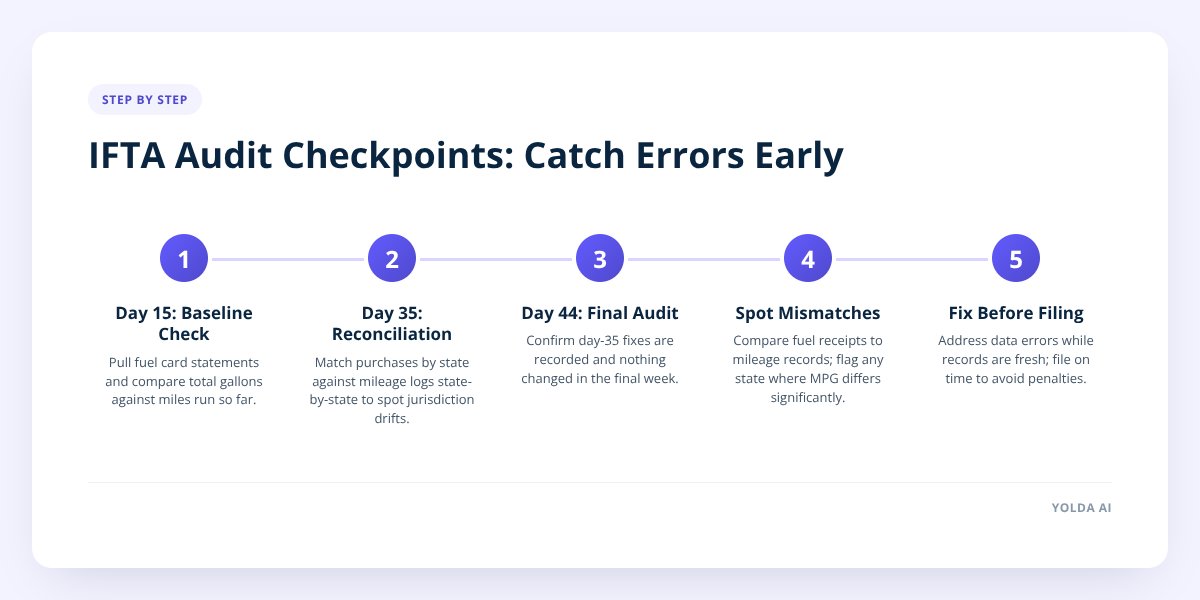
Spreading your audit across three points in the quarter — not just the final week — matches each checkpoint to what's actually knowable at that stage.
Day 15: baseline check. At this point you have roughly five weeks of fuel purchase and mileage data. This isn't a full audit — it's a sanity check. Pull your fuel card statements and compare total gallons purchased against total miles run so far. If your average miles-per-gallon looks wildly different from last quarter with no obvious reason (new routes, different truck, weather), flag it now while drivers still remember the trip.
Day 35: mid-quarter reconciliation. This is your real audit. You now have enough data to compare purchases by jurisdiction against your mileage log by jurisdiction, state by state. This is also the point where a mid-quarter diesel price swing shows up clearest — if fuel costs spiked in one region and drivers rerouted their fill-ups to cheaper states, your gallons-by-state totals can drift from your miles-by-state totals in a way that wasn't true in a stable-price quarter. We go deeper on this specific drift pattern in IFTA When Diesel Prices Swing.
Day 44: final pre-filing audit. One day before most internal filing targets (and roughly two days before the actual IFTA deadline), this is your last clean look at the numbers before you commit to a return. At this stage you're not looking for new problems — you're confirming the day-35 fixes actually landed in your records and nothing changed in the final week of the quarter.
Why not just audit once, right before the deadline? Because day 45-or-later audits only tell you there's a problem — they don't leave you time to fix it. Three checkpoints give you two chances to correct course before the deadline turns into pressure.
How to Spot a Gallons-vs-Purchases Mismatch Before It Becomes a Filing Error
A mismatch shows up as a gap between what your fuel receipts say you bought and what your mileage records say you should have burned, broken out by state. Here's how to find it without waiting for a jurisdiction to find it for you.
Start with the two source documents that should agree with each other:
- Fuel purchase records — gallons bought, by state, from fuel card statements or paper receipts.
- Mileage records by jurisdiction — miles driven in each state, from ELD data or trip logs.
Then do the comparison manually or with software:
- Calculate miles-per-gallon for each truck, by state, for the period.
- Compare that number against the truck's known average MPG from a stable quarter.
- Flag any state where the gap exceeds what normal driving variation would explain — a sudden jump from 6.5 to 9 MPG in one state usually means a data problem, not a fuel-efficient week.
- Check for fuel purchased in a state the truck's mileage log shows no miles driven in at all — a classic sign of a border-town fill-up logged to the wrong jurisdiction.
- Check for tax-exempt fuel (reefer units, off-road use) that got mixed into taxable totals, which is more likely to happen when drivers are fueling more frequently during a price spike.
If you're doing this by hand across a mixed fleet, this is exactly the point where manual spreadsheets break down — a gap that's obvious on one truck gets buried in a stack of statements across twenty trucks. Our free IFTA calculator lets you check a quarter's numbers state by state before you file.
One-Sheet Checklist: What Your IFTA Audit Should Catch
A thorough mid-quarter audit covers four categories. Miss any one of them and you risk a return that looks complete but isn't accurate.
- Confirm total purchases by state match your fuel card or receipt totals exactly, with no rounding gaps.
- Flag any tax-exempt fuel (off-road, reefer, bulk storage) and keep it separate from taxable gallons.
- Verify in-service miles by jurisdiction against ELD or trip-log data, not driver estimates.
- Check for any refunds or credits owed from jurisdictions where you overpaid tax in a prior quarter.
- Confirm every truck in your fleet has a complete record for the full quarter — no gaps from a truck that changed drivers or went into the shop.
- Reconcile any fuel purchased on a personal card or cash, which is easy to lose track of during a price spike when drivers shop around.
- Double-check that gallons reported match the unit truck actually driving the route — a trailer swap or truck substitution mid-load can scramble which vehicle's record gets the fuel.
Run this list at your day-35 checkpoint in full, then again at day 44 as a final confirmation pass.
How a TMS With Live Fuel Data Catches Errors Before You File
A transportation management system that pulls fuel purchases automatically — instead of relying on manual spreadsheet entry — catches a gallons-vs-mileage mismatch the same week it happens, not five weeks later during a quarter-end scramble. That timing difference is the whole game: an error caught on day 20 is a two-minute fix, and the same error caught on day 44 might mean an amended return after filing.
Yolda handles IFTA fuel-tax calculation as part of its compliance tools, built to work whether fuel data is entered manually or scanned in from receipts — so purchases get tied to the right truck and jurisdiction as they happen, rather than reconstructed from a shoebox of statements right before the deadline. You can see how the fuel-tax side works on the IFTA reporting page.
The point isn't to replace your judgment — it's to make the day-15 and day-35 checkpoints take minutes instead of hours, so you actually do them instead of skipping straight to the deadline.
What to Do Next
Pick your next quarter's three checkpoint dates right now, before the current quarter's pressure fades and you forget. Put them on the same calendar where you track CDL renewals or inspection dates — IFTA deadlines deserve the same "never miss it" treatment as any other compliance date.
If diesel prices keep swinging the way they have this year, the fleets that come out ahead won't be the ones with the best price predictions — they'll be the ones whose fuel and mileage records stay reconciled all quarter long, not just in the final 48 hours. Start a free trial or book a demo to see how live fuel data fits into your existing filing routine.
Checklist: Audit Your IFTA Numbers Mid-Quarter
- Pull fuel card statements and mileage logs at day 15 for a baseline MPG check.
- Compare gallons purchased by state against miles driven by state at day 35.
- Flag any state where MPG deviates sharply from the truck's historical average.
- Separate tax-exempt fuel (reefer, off-road) from taxable totals before filing.
- Reconcile any personal-card or cash fuel purchases drivers made during price spikes.
- Confirm every truck has a complete quarter record, including any mid-quarter driver or trailer swaps.
- Check for refunds or credits owed from prior-quarter overpayments.
- Run a final confirmation pass at day 44, two days ahead of your internal filing target.


