
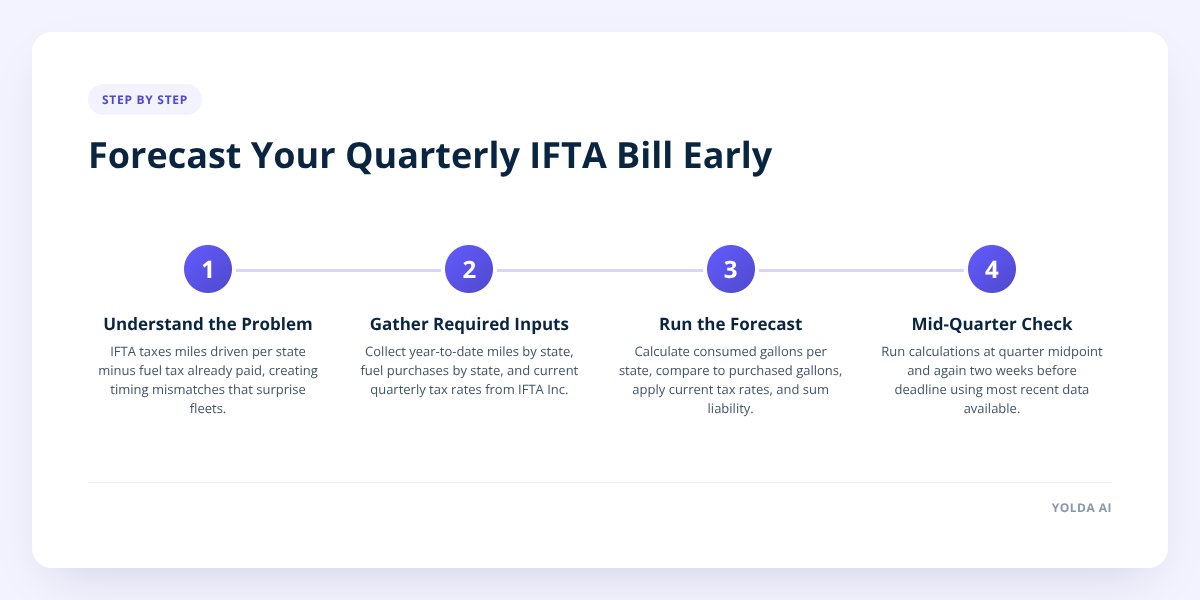
Quick answer: An IFTA calculator forecasts your quarterly fuel tax liability by combining your year-to-date miles per state, gallons purchased per state, and the current tax rate each jurisdiction publishes for that quarter. Run the numbers at the midpoint of the quarter and again two weeks before the filing deadline, using the most recent fuel price and mileage data you have. That gives you a working estimate to budget against instead of waiting for the actual bill to land after the quarter closes.
Key takeaways
- The International Fuel Tax Agreement covers 48 U.S. states and 10 Canadian provinces, and each jurisdiction sets its own quarterly tax rate, according to the IFTA Inc. rate matrix published every quarter.
- Fuel tax rates can change every quarter — some jurisdictions adjust rates based on average fuel prices, so a rate that applied in Q1 may not hold in Q2.
- Your liability depends on the net tax rate — the difference between the tax rate in the state where you drove and the tax already baked into the price where you bought fuel — not just miles driven.
- Forecasting mid-quarter, rather than waiting for quarter-end, gives you time to adjust driver settlements or set aside cash before the payment is due.
Step 1: Understand why IFTA bills catch fleets off guard
The core problem is a timing mismatch: you buy fuel in real time, but you only find out your true tax exposure weeks or months later. IFTA doesn't tax you on fuel you bought — it taxes you on miles you drove in each jurisdiction, then credits you for tax you already paid at the pump.
If a truck buys most of its fuel in a low-tax state but drives a lot of miles through a high-tax state, the fleet owes the difference. If it's the reverse, the fleet gets a credit. Multiply that by dozens of trucks crossing a dozen state lines a quarter, and small mismatches turn into real dollars.
Three things drive the surprise:
- Mileage and fuel purchases don't line up. A driver might fuel up heavily in Oklahoma, then run 800 miles through California, where the tax rate is typically among the highest in the IFTA matrix.
- Rates change every quarter. Some states index their fuel tax to average fuel prices, so a rate from three months ago isn't reliable for the current quarter.
- Reporting lag hides the problem. If you're pulling ELD mileage and reconciling fuel receipts only after the quarter ends, you're seeing the bill for the first time when it's already due — no room to plan.
This is the same mismatch we cover from the fuel-price side in How Rising Fuel Prices Change Your IFTA Tax Bill — rate changes and price swings compound each other.
Step 2: Know what an IFTA calculator actually needs as input
An IFTA calculator is only as accurate as the three inputs you feed it: miles by jurisdiction, gallons purchased by jurisdiction, and the current tax rate table. Get any one of these wrong and the forecast is wrong.
Here's what each input requires and where accuracy typically breaks down:
| Input | Source | Common accuracy problem |
|---|---|---|
| Miles per state | ELD or GPS trail data | Trip legs that cross a state line mid-route get misassigned |
| Gallons purchased per state | Fuel receipts or fuel card data | Receipts missing state, or personal card purchases not logged |
| Tax rate per jurisdiction | IFTA Inc. quarterly rate matrix | Using last quarter's rate instead of the current one |
| Exemptions | State-specific rules (e.g., off-road miles, government contracts) | Exempt miles counted as taxable, inflating the estimate |
The output of a good forecast isn't just "you owe $X." It should break down net liability by state, so you can see exactly which jurisdictions are driving the number — that's what lets you act on it instead of just budgeting for a lump sum.
Don't skip this: A forecast built on stale tax rates is worse than no forecast at all, because it gives you false confidence. Always confirm you're using the current quarter's rate matrix from IFTA Inc. or your base jurisdiction's IFTA administrator before you rely on a number for budgeting.
Step 3: Run the forecast — a step-by-step walkthrough
Here's the actual sequence to follow, ideally at the midpoint of the quarter and again about two weeks before the filing deadline.
- Pull year-to-date mileage by state. Export this from your ELD or dispatch system, broken out by jurisdiction, not just total miles.
- Pull year-to-date fuel purchases by state. Match gallons to the state where the purchase happened, not the state where the truck is based.
- Load the current quarter's tax rates. Get the latest matrix from your base state's IFTA office or the IFTA Inc. website — don't reuse a saved spreadsheet from last quarter.
- Calculate average fleet MPG. Total miles divided by total gallons, ideally per truck if fuel efficiency varies a lot across your fleet.
- Estimate taxable gallons per state. Divide each state's miles by your average MPG to estimate gallons consumed there, regardless of where you bought the fuel.
- Compare consumed gallons to purchased gallons per state. The gap is your net taxable or net credit position for that jurisdiction.
- Apply the current tax rate to the net gap. This gives you the dollar amount owed or credited per state.
- Sum across all states for your projected quarterly liability.
Worked example: say a truck runs 3,000 miles through a state with a fuel tax rate of $0.30/gallon, averages 6.5 MPG, and the driver bought no fuel in that state at all. That's roughly 462 taxable gallons with zero purchase credit — about $139 owed to that one state alone. Multiply that pattern across a dozen trucks and a handful of high-tax states, and you can see how a fleet ends up with a five-figure liability nobody budgeted for.
Step 4: Watch for red flags that mean you need to recalculate
Recalculate mid-quarter whenever diesel prices move sharply, a truck's route pattern changes, or you onboard new lanes — waiting until quarter-end to notice means you've lost your window to react. Diesel price swings matter here for a specific reason: they don't change your mileage-based tax liability directly, but they change how much fuel-tax credit you're banking per gallon purchased, and they change what your drivers expect to see in their settlement.
Recalculate when you see:
- A diesel price spike or drop of more than a few cents a gallon sustained for more than a week or two — this shifts where it makes sense to fuel up and changes your credit position.
- A new lane or customer contract that routes trucks through states you haven't run in previous quarters.
- A rate change notice from any state you operate in — these are published quarterly and don't always make headlines.
- A noticeable drop in fleet MPG — often a sign of idling, route inefficiency, or a maintenance issue that's also inflating your fuel spend.
- Driver turnover on a run — a new driver may take a different route through different states than the one they replaced.
We go deeper on the diesel-price side of this in How Diesel Price Spikes Throw Off IFTA and Settlements, including how a spike that lasts three weeks can move your quarterly number more than a spike that lasts three days.
Step 5: Use the forecast to adjust driver settlements before it's a problem
The real value of forecasting isn't just knowing the number — it's having time to adjust driver settlements and cash flow before the tax bill and payroll collide in the same week. If your fuel surcharge or per-mile driver rate assumes a fuel price that's now out of date, your settlements and your IFTA forecast are both drifting off the same bad assumption.
Practical ways to use a mid-quarter forecast:
- Set aside cash incrementally. If your forecast shows a $12,000 liability building over the quarter, moving a third of that aside each month is easier than finding it all at once in week 13.
- Flag fuel surcharge terms that need review. If diesel has moved significantly since you set a driver's fuel surcharge, the forecast is a natural trigger to revisit it — we walk through the mechanics of this in Track Fuel Costs and Recalculate Driver Pay Mid-Contract.
- Cross-check the forecast against settlement records before you finalize either. Errors in mileage or fuel data show up in both places, and reconciling them together catches more than checking them separately, a process covered in How to Audit Driver Settlements for Accuracy Before Payment.
- Smooth across quarters, not just within one. A fleet that overpaid its Q1 estimate and got a credit shouldn't spend that credit — it's a buffer against a Q3 spike.
This is also where having your mileage, fuel, and settlement data in one place instead of three spreadsheets pays off. Yolda handles quarterly IFTA calculation from the same fuel and mileage records that feed weekly driver settlements, so a rate change or a diesel spike shows up in both places at once instead of surfacing separately, weeks apart, after the damage is already in a driver's paycheck.
What to Do Next
Forecasting IFTA quarterly, instead of finding out at filing time, is the difference between adjusting a driver's fuel surcharge in week 6 and explaining a shortfall in week 13. Build the habit around your existing reporting cadence — most fleets already pull mileage and fuel data monthly for other reasons, so layering a tax forecast on top costs little extra time.
If you're not sure your current numbers are right, start with an audit of the last quarter's actual filing against what a forecast would have predicted. That gap tells you exactly where your data — mileage, fuel receipts, or rate tables — needs tightening before you rely on next quarter's estimate.
Checklist: Forecasting your quarterly IFTA liability
- Export year-to-date miles by state from your ELD or dispatch system.
- Match fuel purchases to the state where each purchase happened.
- Download the current quarter's tax rate matrix from IFTA Inc. or your base jurisdiction.
- Calculate average fleet MPG, per truck if efficiency varies significantly.
- Estimate taxable gallons per state using mileage divided by MPG.
- Compare consumed gallons to purchased gallons to find each state's net position.
- Apply current rates to get a dollar estimate per state, then total the fleet.
- Flag any state with a rate change or a big mileage shift since last quarter.
- Set aside projected liability incrementally rather than waiting for the invoice.
- Recalculate mid-quarter if diesel prices move sharply or routes change.

