
Quick answer: The right trucking dispatch software fits your fleet's actual workflow — dispatch, DVIR, IFTA, driver settlements, invoicing, and hiring — without forcing you to bolt on three other tools. Look for a system that covers your compliance documents, ties driver pay to a reviewed approval process rather than auto-pay, and integrates with the ELD and accounting tools you already use. Ask vendors directly which integrations are live today versus "on the roadmap," because that gap is where most buyer's remorse comes from.
Key takeaways
- A true TMS (transportation management system) combines dispatch, compliance, settlements, and invoicing — a standalone dispatch board only handles load assignment and status tracking.
- Vendor integration lists often include partners that are "planned" rather than working today; ask which ones are live in the product right now.
- Software that auto-pays drivers without a human review step creates real compliance and dispute risk — every pay item should pass a review queue before it's finalized.
- Quarterly IFTA fuel-tax calculation, DVIR document expiry tracking, and driver settlement statements are the three features that save the most administrative time for small and mid-size fleets.
What should a trucking dispatch software actually cover?
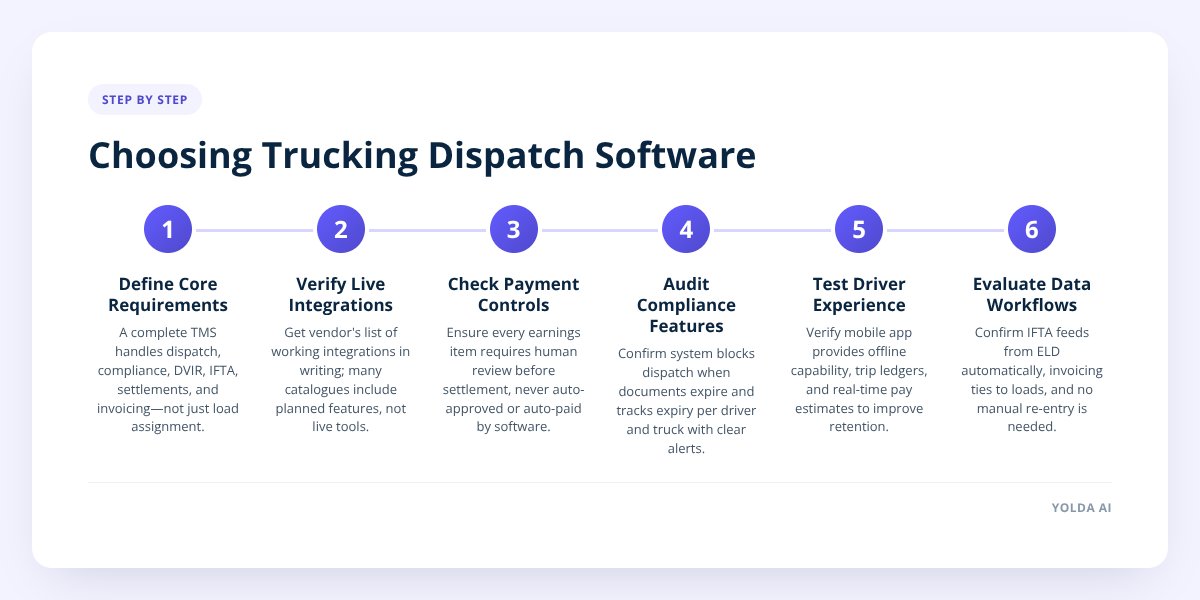
A complete system should handle six things: dispatch and load status, a driver mobile app, DOT compliance and DVIR tracking, IFTA fuel-tax reporting, driver settlement calculation, and invoicing. If a product only does one or two of those, you're not buying a TMS — you're buying a point tool that you'll need to connect to two or three others.
That distinction matters more than it sounds. We covered the difference in detail in TMS Software vs Dispatch Software: Differences, but the short version is: dispatch software moves loads from pickup to delivery. A TMS does that and tracks the compliance documents that let you legally dispatch a driver, and turns the completed loads into a settlement and an invoice.
Here's what to check for in each category:
- Dispatch: Full load status pipeline, dispatcher and driver notes, and the ability to read a rate confirmation and pull load details from it for a human to approve — not auto-populate and auto-book.
- Driver mobile app: Assigned and upcoming loads, route maps, a trip ledger for fuel and tolls, document upload, and load-specific chat — not just a notification feed.
- DOT compliance & DVIR: A compliance matrix that tracks document expiry per driver and per truck, and blocks dispatch when something lapses. If you're still running paper DVIR books, Paper DVIR Logs vs Mobile DVIR App: Fleet Changes walks through what actually changes when you switch.
- IFTA reporting: Quarterly fuel-tax calculation from either manual entry or scanned receipts, matched to miles run per jurisdiction.
- Driver settlements: Pay agreements, deductions, bonuses, and reimbursements that flow into a weekly statement — with an approval step before anything is finalized.
- Invoicing: Receivables tied directly to completed loads, so you're not re-keying load data into a separate accounting tool.
What questions should I ask a TMS vendor before signing?
Ask which integrations are actually live in the product today, not listed as "coming soon" or "in our catalog." Software vendors commonly publish integration catalogs with 80–100+ partner logos, but a meaningful share of those are planned, inert, or require a separate contract with the third party. Get a straight answer in writing.
Beyond integrations, these questions separate a system that fits your fleet from one that'll frustrate your dispatchers within a month:
- Does driver pay ever move automatically, or does a person review it first? Every earnings item — load pay, bonuses, deductions, reimbursements, prepayments — should sit in a review queue before it hits a settlement. A platform that auto-approves or auto-pays removes your ability to catch an error before a driver sees it.
- Who actually moves the money — the software or my bank? Some platforms present themselves as payment processors. Others, like Yolda, record which payment method you used (ACH, payroll, check, wire, cash) but the money moves through your own bank or payroll — the software never collects, holds, or disburses driver pay.
- Does the driver app work offline? Most don't, beyond buffering location pings for spotty coverage. If a driver is in a dead zone for six hours, find out what happens to a DVIR submission or a BOL photo mid-upload.
- What happens when a compliance document expires mid-trip? You want a system that blocks dispatch with a clear banner, not one that silently lets an expired document slide until someone notices during an audit.
- How is IFTA data entered — manual, scanned, or ELD-fed? If you already run an ELD, ask specifically whether mileage data flows into fuel-tax calculation automatically or if someone's still typing it in.
- Can a driver see their own pay estimate before the load is done? This matters for retention. We dug into why in Fix Driver Turnover With Transparent Settlement Reporting — drivers who can see a running estimate file fewer settlement disputes.
Don't skip this: Get the list of live integrations in writing before you sign anything long-term. A glossy catalog page is not a contract, and "we're building that" can mean six months or two years.
What are the red flags when evaluating a TMS?
The biggest red flag is a platform that touches driver pay without a human checkpoint. If load pay, bonuses, or deductions can post to a driver's settlement without anyone reviewing them first, one bad data entry or one misread rate confirmation becomes a paycheck dispute — and those disputes cost more than the software saves. We broke down the real cost of settlement mistakes in What Driver Settlement Errors Really Cost Your Fleet.
Other warning signs to watch for:
| Red flag | Why it matters |
|---|---|
| Vendor can't name which integrations are live vs. planned | You may be buying a feature that doesn't exist yet |
| No document expiry tracking tied to dispatch blocking | Expired CDLs, medical cards, or insurance can slip through unnoticed |
| Settlement math isn't visible to drivers before payday | Drives disputes and turnover — see settlement reporting above |
| Pricing scales per driver with no visibility into what's included | Hard to budget as your fleet grows or contracts seasonally |
| No audited access log for who viewed driver bank details | A compliance and trust problem, not just a software gap |
| "Offline mode" claims for a driver app | Very few mobile TMS apps genuinely function fully offline — verify what's buffered vs. what requires signal |
A second-tier red flag: software that claims industry-specific modules for every niche under the sun — hazmat handling, container scheduling, tow-call dispatch — but can't clearly explain how those modules actually differ from the general dispatch and compliance workflow. Often what's being sold is the same core system with different marketing copy. That's not necessarily bad, but you should know what you're actually getting.
Why does it matter that a TMS fits DOT-regulated fleets generally, not just "trucking"?
Because the compliance and settlement backbone is the same across almost every DOT-regulated hauling operation, a system built for general freight can be a near drop-in fit for adjacent fleets — without needing dedicated features built for your specific niche. Moving and relocation companies, auto transport and car haulers, tanker and bulk haulers, courier and hotshot fleets, waste and roll-off haulers, and construction material haulers all run the same underlying requirements: a driver roster, expiring compliance documents, DVIRs, quarterly IFTA filings, and a weekly settlement cycle.
That's worth knowing before you pay extra for a "vertical-specific" platform. If a vendor tells you they have a dedicated module built just for auto transport or waste hauling, ask exactly what that module does differently from general dispatch and compliance tracking — sometimes the honest answer is "nothing, it's the same system." A platform like Yolda is built around that shared DOT/driver/settlement backbone rather than dozens of narrow vertical modules, which is why it applies across freight, moving, tanker, and hauling operations alike without needing a hazmat-specific or container-specific build.
How do I know if the pricing actually fits a small or mid-size fleet?
Ask for a per-driver or per-truck price with a clear list of what's included, and confirm whether compliance tracking, IFTA calculation, and settlement reporting are bundled or sold as add-ons. TMS pricing structures vary widely — some vendors price by active driver count, others by truck count, and some charge separately for the driver mobile app or for IFTA reporting as a module. There's no single "right" price to expect, so the more useful question is whether the quote covers everything in this guide's checklist or just dispatch and a promise of "more modules soon."
Also confirm what happens seasonally. If you run 12 trucks in peak season and 8 in the off-season, ask whether your bill adjusts with active driver count or is locked to a fixed contract.
Setting Up Trucking Dispatch Software
- Gather your current driver roster, truck and trailer list, and pay agreements before your first demo.
- List every compliance document you currently track (CDL, medical card, insurance, IFTA license) and ask how each is monitored for expiry.
- Ask the vendor for a written list of integrations that are live today, not planned.
- Confirm settlement pay never posts without a human review step in the workflow.
- Clarify who moves the money — your bank/payroll or the software itself.
- Request a sample settlement statement and a sample invoice to review the layout before committing.
- Check whether IFTA data entry is manual, scanned, or ELD-fed, and whether that matches your current ELD.
- Ask for per-driver or per-truck pricing in writing, including what happens if your fleet size changes seasonally.
If you're weighing a switch, Yolda's dispatch, DVIR, IFTA, settlement, and invoicing workflow is built to be a near drop-in fit for DOT-regulated fleets — reach out through yolda.ai to see how it lines up against your current setup.

